Based on contributions by AaronM.
The ENC28J60 is a cheap SPI Ethernet module that gives an Arduino a wired network connection when you don’t have (or don’t want to rely on) Wi-Fi. Use it when your project needs to send or receive data over a LAN, for example to act as a simple web server or TCP client.
What you need
- Arduino UNO or Arduino Mega
- ENC28J60 Ethernet module
- 6 jumper wires
- Arduino IDE with the EthernetENC library installed (library docs)
Steps
1. Wire the module (Arduino UNO)
Connect the ENC28J60 to the UNO as follows:
| Arduino pin | ENC28J60 pin | Purpose |
|---|---|---|
| D13 | SCK | SPI clock |
| D12 | SO | Module output |
| D11 | SI | Module input |
| D10 | CS | Chip select (default; can be changed in code) |
| 3.3V | VCC | Power supply |
| GND | GND | Ground |
Use the Arduino’s 3.3V pin for VCC, not 5V — the ENC28J60 is not 5V tolerant and will be damaged.
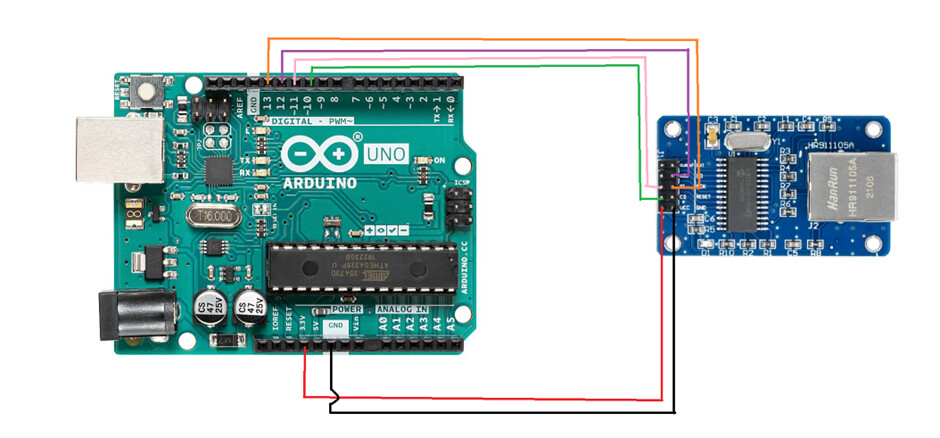
All pins above are the library defaults; only the CS pin can be changed in software.
2. Wire the module (Arduino Mega)
If you’re using a Mega instead of an UNO, the SPI pins are in different locations:
| Arduino pin | ENC28J60 pin |
|---|---|
| D52 | SCK |
| D50 | SO |
| D51 | SI |
| D53 | CS |
| 3.3V | VCC |
| GND | GND |
3. Install the EthernetENC library
In the Arduino IDE, open Sketch → Include Library → Manage Libraries, search for “EthernetENC” and install it. This library supports using the Arduino as either a network client or a server.
4. Configure the network settings
In your sketch, define:
- A MAC address — a unique identifier for the Arduino on the network.
- An IP address — pick one on the same subnet as the rest of your network (e.g. if your laptop is on
192.168.0.x, give the Arduino an unused address like192.168.0.50). - An
EthernetServerobject with the port the Arduino should listen on.

5. Start the connection in setup()
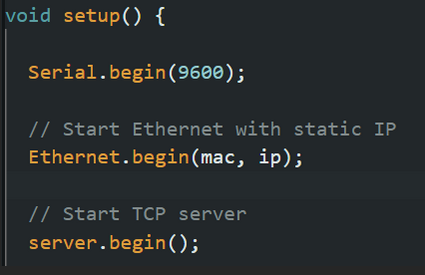
In void setup(), call Serial.begin() to set your serial baud rate, then Ethernet.begin(mac, ip) to bring up the network connection with your chosen MAC and IP, and finally server.begin() to start listening on the configured port.
Common mistakes
- Powering the module from 5V instead of 3.3V — this damages the ENC28J60.
- Reusing an IP address that’s already taken on the network, or using a subnet that doesn’t match the rest of your LAN.
- Wiring the Mega with the UNO pin numbers (SPI pins differ between the two boards).
Related
- How to switch higher-voltage loads with an Arduino (relay, optocoupler, H-bridge) — switching higher-voltage loads with an Arduino
Rewritten and consolidated (Sept 2026) from the original student how-to’s: How-to: connect an Arduino to ethernet via an ENC28J680 Module.