Based on contributions by Mark.jensen.
Use RTDE (Real-Time Data Exchange) when you want to control a UR robot from Python directly — for example driving it from a web interface or from calculations that happen outside Polyscope. RTDE runs in the background of the robot controller and lets you read robot state (TCP pose, joint angles, IO status, …) and send move/servo/IO commands, without going through the Polyscope programming interface.
What you need
- A UR robot and a PC on the same network — see How to find and set the IP address for connecting a PC to a UR robot to find/set the IP addresses
- Python with the
ur_rtdepackage (from SDU, University of Southern Denmark) installed - The robot’s controller in Remote Control mode
Steps
1. Install the ur_rtde library
Activate your Python environment (example for Anaconda):
conda activate <your_environment_name>
Then install the library:
pip install ur_rtde
Check: this install command is copied verbatim from the source topic. The official installation guide lists OS-specific instructions (some platforms need
conda-forgeinstead ofpip) — check it before relying onpip installalone: https://sdurobotics.gitlab.io/ur_rtde/installation/installation.html
2. Import the RTDE interfaces
import rtde_control  # for controlling the robot
import rtde_receive  # for receiving data from the robot
import rtde_io        # for robot IO
3. Connect to the robot
robot_ip = "192.168.0.xxx"  # replace with your robot's IP address, see [How to find and set the IP address for connecting a PC to a UR robot](/t/how-to-find-and-set-the-ip-address-for-connecting-a-pc-to-a-ur-robot/4721)

rtde_ctrl = rtde_control.RTDEControlInterface(robot_ip)
rtde_rec = rtde_receive.RTDEReceiveInterface(robot_ip)
rtde_inout = rtde_io.RTDEIOInterface(robot_ip)
4. Enable remote control on the robot
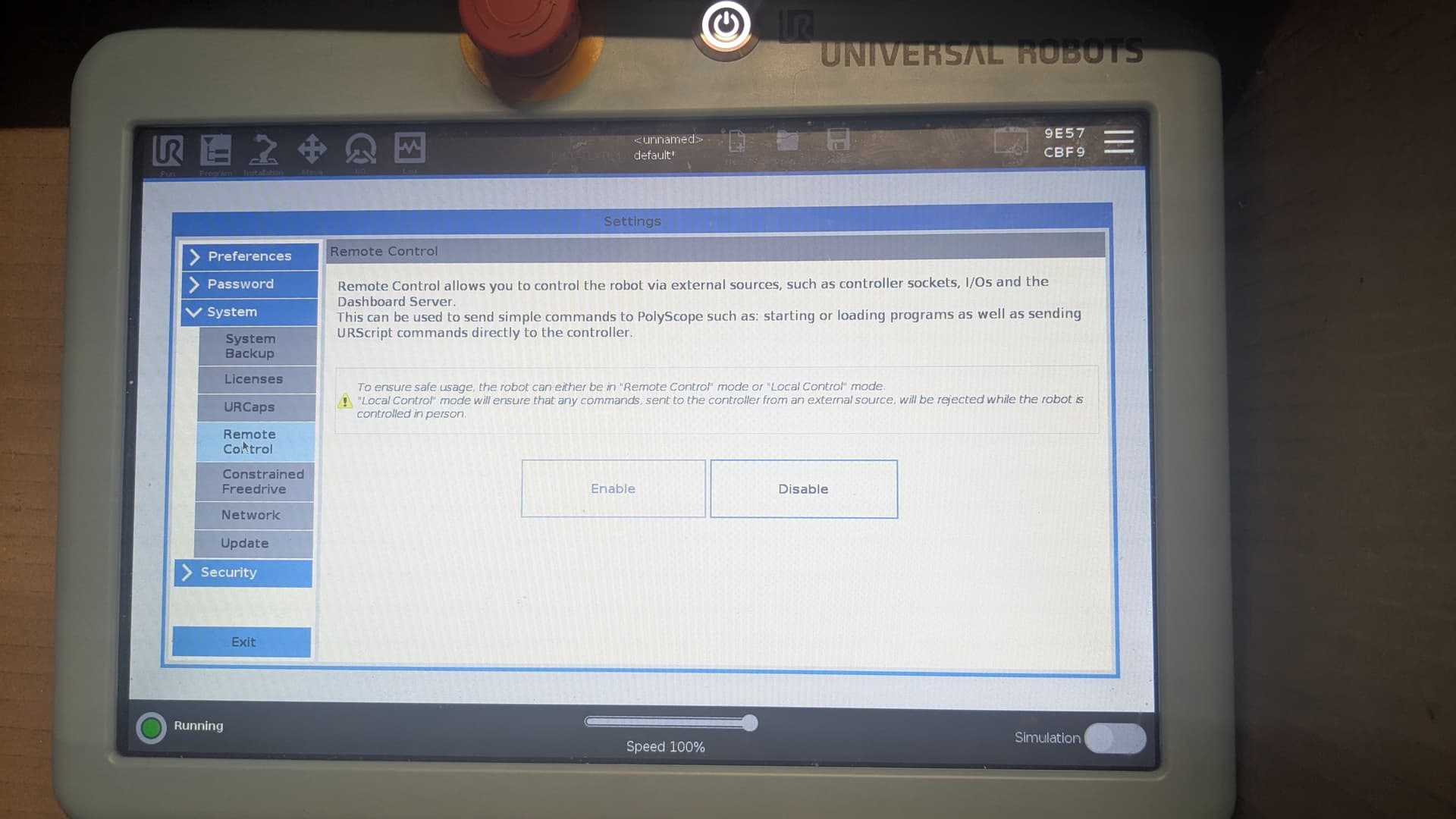
- On the teach pendant, press the ≡ icon top right, then go to Settings → System → Remote control, and enable it.
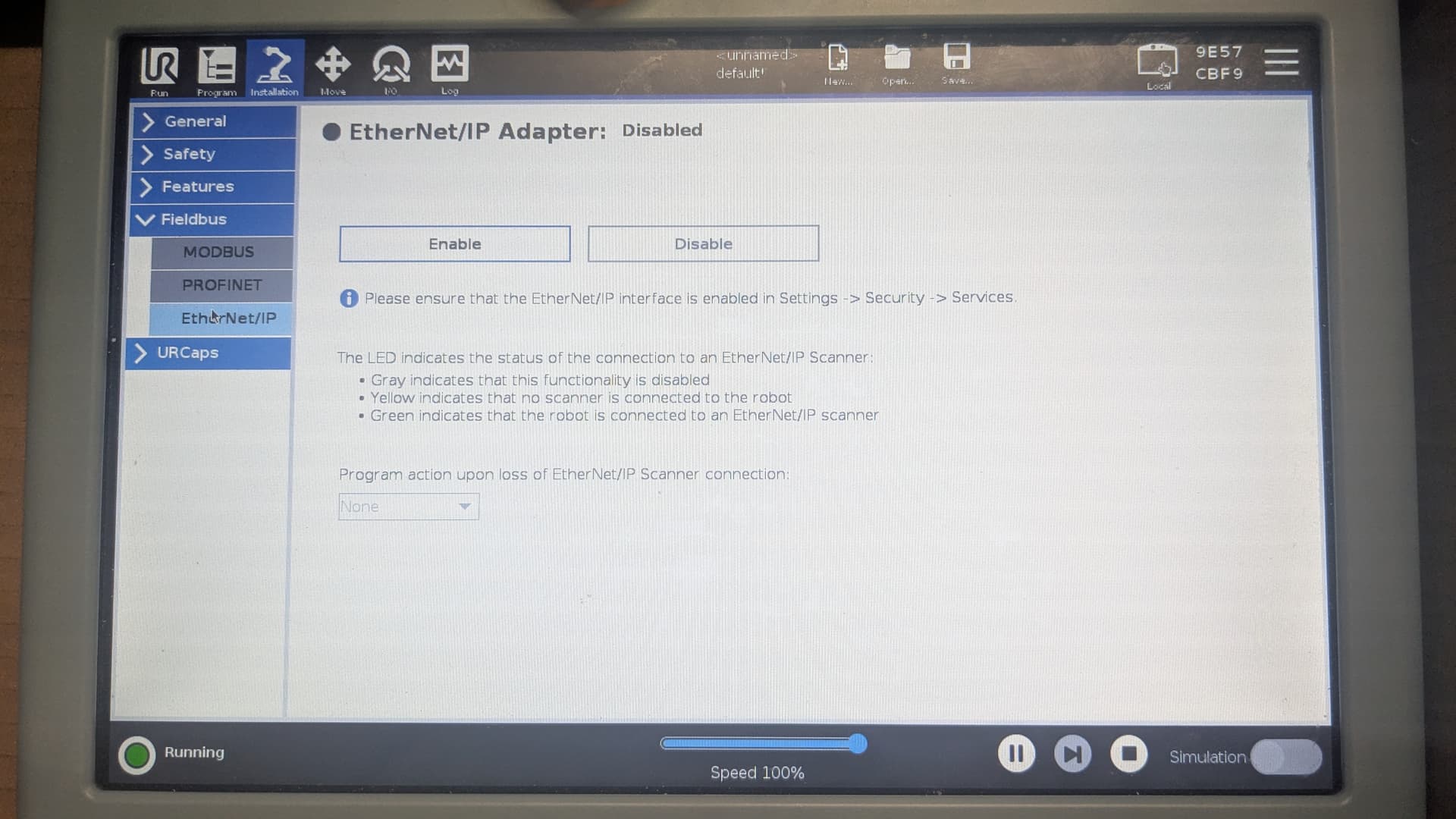
- Go to Installation → Fieldbus and disable Ethernet/IP, Profinet and MODBUS, then save the configuration. RTDE will fail to connect while any of these are enabled.
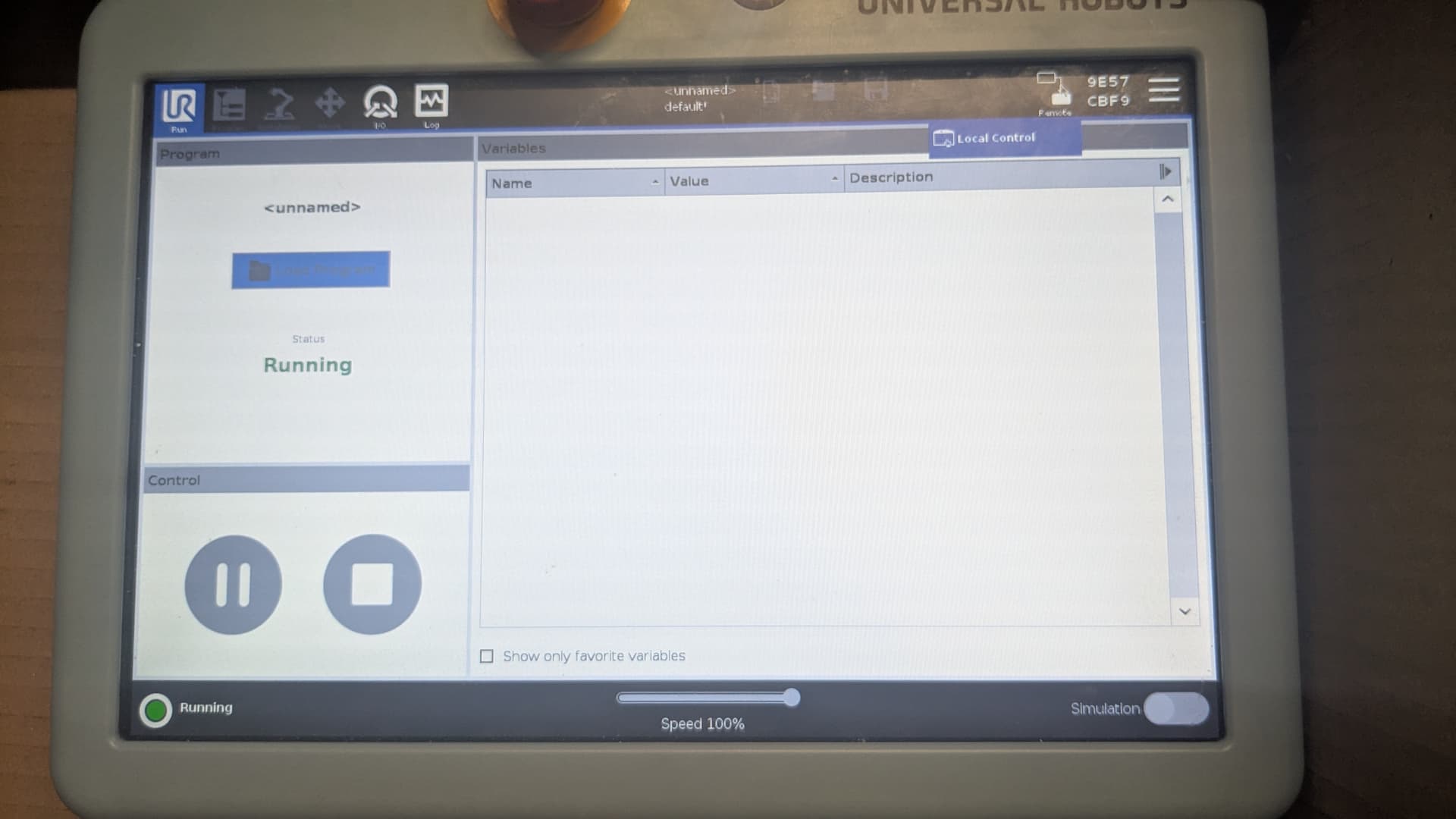
- Press the remote/local button top right of the screen and switch to Remote to control the robot with RTDE. Switch back to Local to control it from the Polyscope interface again.
5. Use the library
The RTDE library uses approximately the same syntax as URScript.
Set a standard digital output (also works for safety, tool or configurable outputs):
rtde_inout.setStandardDigitalOut(7, False)
Read a digital input (also works for safety, tool or configurable inputs):
rtde_rec.getDigitalInState(7)
0-7: standard digital inputs8-15: configurable inputs16-17: tool inputs
Move the robot:
rtde_ctrl.moveJ([x, y, z, rx, ry, rz], speed, acceleration)
moveL and moveP work the same way. x, y, z must be given in meters (Polyscope displays them in mm), rx, ry, rz in radians (same as Polyscope). Blend radius and move time are not supported for a single move via RTDE — use a move path instead (see the ur_rtde API docs).
Blend radius via a move path:
pos_1 = [x_1, y_1, z_1, rx_1, ry_1, rz_1, speed_1, acceleration_1, blend_radius_1]
pos_2 = [x_2, y_2, z_2, rx_2, ry_2, rz_2, speed_2, acceleration_2, blend_radius_2]
path = [pos_1, pos_2]

rtde_ctrl.moveL(path)
A blend radius can only be applied to movements defined as a path, not to two single moves called one after another.
Move to specific joint rotations:
import math

joint_rotation = [
    math.radians(base_rotation),
    math.radians(shoulder_rotation),
    math.radians(elbow_rotation),
    math.radians(wrist_1_rotation),
    math.radians(wrist_2_rotation),
    math.radians(wrist_3_rotation),
]

rtde_ctrl.moveJ(joint_rotation)
Enter the rotation values in degrees (as displayed in Polyscope) — math.radians() converts them.
move commands are blocking by default: the Python program waits for the movement to finish before continuing.
Get the actual TCP pose:
rtde_rec.getActualTCPPose() # returns the TCP position as a list
Get the actual TCP force (e-Series robots only):
rtde_rec.getActualTCPForce() # returns the TCP forces as a list
Jogging (a linear movement, non-blocking, unlike move):
jog_speed_down_z = [0.0, 0.0, -0.1, 0.0, 0.0, 0.0]  # m/s for translation (downward)

rtde_ctrl.jogStart(jog_speed_down_z, feature, acceleration)  # feature/frame: use 0 for the default base feature; acceleration in m/s^2

# ... later, to stop:
rtde_ctrl.jogStop()
Because jogging is non-blocking, always call jogStop() yourself once the robot has moved far enough.
Stop the RTDE script cleanly:
rtde_ctrl.stopScript()
This makes sure the RTDE connection is closed properly instead of staying occupied.
The RTDE library is designed for C++; most functions have been translated to Python, but not all. You can also send a custom URScript via RTDE for functionality that isn’t wrapped — check the documentation. The most commonly used functions all work directly from Python.
6. Build a reusable control class (optional)
Wrapping the interfaces in a class keeps error handling in one place and makes the rest of your code easier to read:
import rtde_control  # for controlling the robot
import rtde_receive  # for receiving data from the robot
import rtde_io        # for robot IO

import time
import logging
import numpy as np

logging.basicConfig(
    level=logging.DEBUG,
    format="%(asctime)s - %(levelname)s - %(message)s",
    datefmt="%Y-%m-%d %H:%M:%S",
)


class URControl:
    """Wraps ur_rtde for a UR robot. Create with the robot's IP address, then call connect()."""

    def __init__(self, robot_ip):
        self.robot_ip = robot_ip
        self.rtde_ctrl = None
        self.rtde_rec = None
        self.rtde_inout = None

    def connect(self):
        """Connect to the robot, retrying a few times if it's not ready yet."""
        max_retries = 10
        retry_delay = 0.5  # seconds between retries

        for attempt in range(1, max_retries + 1):
            try:
                self.rtde_ctrl = rtde_control.RTDEControlInterface(self.robot_ip)
                self.rtde_rec = rtde_receive.RTDEReceiveInterface(self.robot_ip)
                self.rtde_inout = rtde_io.RTDEIOInterface(self.robot_ip)
                logging.info(f"Connected to robot: {self.robot_ip} on attempt {attempt}")
                return
            except Exception as e:
                logging.error(f"Attempt {attempt} failed: {e}")
                if attempt < max_retries:
                    time.sleep(retry_delay)
                else:
                    logging.error("Max retries reached. Unable to connect to the robot.")
                    raise

    def stop_robot_control(self):
        self.rtde_ctrl.stopScript()
        logging.info("Stopped connection with robot")

    def set_tool_frame(self, tool_frame):
        try:
            self.rtde_ctrl.setTcp(tool_frame)
        except Exception as e:
            logging.error(f"Error setting tool frame: {e}")

    def set_tcp(self, tool_frame):
        self.set_tool_frame(tool_frame)

    def set_payload(self, payload, cog):
        """Set payload (kg) and center of gravity [CoGx, CoGy, CoGz]. (not tested by the original author)"""
        try:
            self.rtde_ctrl.setPayload(payload, cog)
        except Exception as e:
            logging.error(f"Cannot set CoG and/or payload: {e}")

    def set_digital_output(self, output_id, state):
        try:
            self.rtde_inout.setStandardDigitalOut(output_id, state)
            logging.info(f"Digital output {output_id} is {state}")
        except Exception as e:
            logging.error(f"Error setting digital output {output_id}: {e}")

    def pulse_digital_output(self, output_id, duration):
        """Set a digital output high for `duration` seconds, then low again."""
        self.set_digital_output(output_id=output_id, state=True)
        time.sleep(duration)
        self.set_digital_output(output_id=output_id, state=False)

    def move_l(self, pos, speed=0.5, acceleration=0.5):
        try:
            self.rtde_ctrl.moveL(pos, speed, acceleration)
        except Exception as e:
            logging.error(f"Cannot move: {e}")

    def move_l_path(self, path):
        try:
            self.rtde_ctrl.moveL(path)
        except Exception as e:
            logging.error(f"Cannot move: {e}")

    def move_j(self, pos, speed=0.5, acceleration=0.5):
        """(not tested by the original author)"""
        try:
            self.rtde_ctrl.moveJ(pos, speed, acceleration)
        except Exception as e:
            logging.error(f"Cannot move: {e}")

    def move_add_l(self, relative_move, speed=0.5, acceleration=0.5):
        """Relative linear move based on the current TCP position."""
        try:
            current_tcp_pos = self.get_tcp_pos()
            new_linear_move = [current_tcp_pos[i] + relative_move[i] for i in range(6)]
            self.move_l(new_linear_move, speed, acceleration)
        except Exception as e:
            logging.error(f"Cannot do relative move: {e}")

    def move_add_j(self, relative_move, speed=0.5, acceleration=0.5):
        """Relative joint move based on the current TCP position."""
        try:
            current_tcp_pos = self.get_tcp_pos()
            new_joint_move = [current_tcp_pos[i] + relative_move[i] for i in range(6)]
            self.move_j(new_joint_move, speed, acceleration)
        except Exception as e:
            logging.error(f"Cannot do relative move: {e}")

    # --- helper functions for pose_trans, since RTDE has no built-in pose_trans ---

    def rodrigues_to_rotation_matrix(self, r):
        """Convert a Rodrigues rotation vector to a rotation matrix."""
        theta = np.linalg.norm(r)
        if theta < 1e-6:  # no rotation
            return np.eye(3)
        k = r / theta
        K = np.array([
            [0, -k[2], k[1]],
            [k[2], 0, -k[0]],
            [-k[1], k[0], 0],
        ])
        return np.eye(3) + np.sin(theta) * K + (1 - np.cos(theta)) * np.dot(K, K)

    def pose_to_matrix(self, pose):
        """Convert a 6D pose to a 4x4 transformation matrix."""
        R = self.rodrigues_to_rotation_matrix(pose[3:])
        t = np.array(pose[:3])
        T = np.eye(4)
        T[:3, :3] = R
        T[:3, 3] = t
        return T

    def matrix_to_pose(self, matrix):
        """Convert a 4x4 transformation matrix back to a 6D pose."""
        R = matrix[:3, :3]
        t = matrix[:3, 3]
        theta = np.arccos((np.trace(R) - 1) / 2)
        if theta < 1e-6:
            r = np.zeros(3)
        else:
            r = theta / (2 * np.sin(theta)) * np.array([
                R[2, 1] - R[1, 2],
                R[0, 2] - R[2, 0],
                R[1, 0] - R[0, 1],
            ])
        return np.concatenate((t, r))

    def pose_trans(self, pose1, pose2):
        """Combine two poses via matrix multiplication (equivalent to Polyscope's pose_trans)."""
        T1 = self.pose_to_matrix(pose1)
        T2 = self.pose_to_matrix(pose2)
        T_result = np.dot(T1, T2)
        return self.matrix_to_pose(T_result)

    def get_tcp_pos(self):
        try:
            return self.rtde_rec.getActualTCPPose()
        except Exception as e:
            logging.error(f"Cannot return actual TCP pose: {e}")

    def get_joint_pos(self):
        try:
            return self.rtde_rec.getActualQ()
        except Exception as e:
            logging.error(f"Cannot return actual joint pose: {e}")

    def set_tcp_rotation(self, rx, ry, rz, speed=0.1, acc=0.1):
        """Set the rotation of the TCP, in degrees, keeping the current position."""
        current_pose = self.get_tcp_pos()  # [x, y, z, rx, ry, rz]
        current_pose[3] = rx
        current_pose[4] = ry
        current_pose[5] = rz
        self.move_l(current_pose, speed, acc)


if __name__ == '__main__':
    robot = URControl('192.168.0.1')
    robot.connect()
    robot.stop_robot_control()
Troubleshooting / Common mistakes
- RTDE fails to connect if Ethernet/IP, Profinet or MODBUS fieldbus options are still enabled on the robot — disable all three (step 4.2).
- The robot must be in Remote Control mode, not Local, for Python to be able to control it.
- Mixing up units: RTDE moves use meters and radians; Polyscope displays mm and degrees. Convert joint rotations with
math.radians(). - Blend radius / move time only works when passed as part of a move path, not on a single move.
jogStart()is non-blocking — the robot keeps jogging until you calljogStop().- Always call
stopScript()when you’re done, so the RTDE connection isn’t left occupied. set_payload()andmove_j()in the class above were marked “not tested” by the original author — double-check them before relying on them in a real cell.
Related
- How to find and set the IP address for connecting a PC to a UR robot — find/set the robot’s IP address
- How to find and set the IP address for connecting a PC to a UR robot — alternative: plain TCP/IP sockets instead of RTDE
- How to set payload, center of gravity and tool center point on a UR robot at run-time — setting payload and center of gravity at run-time
- How to use a UP Board as a companion computer for a UR robot — running your Python control script from a UP board instead of a laptop
Rewritten and consolidated (Sept 2026) from the original student how-to’s: How to control a UR robot from python using RTDE.