Charuco Generation
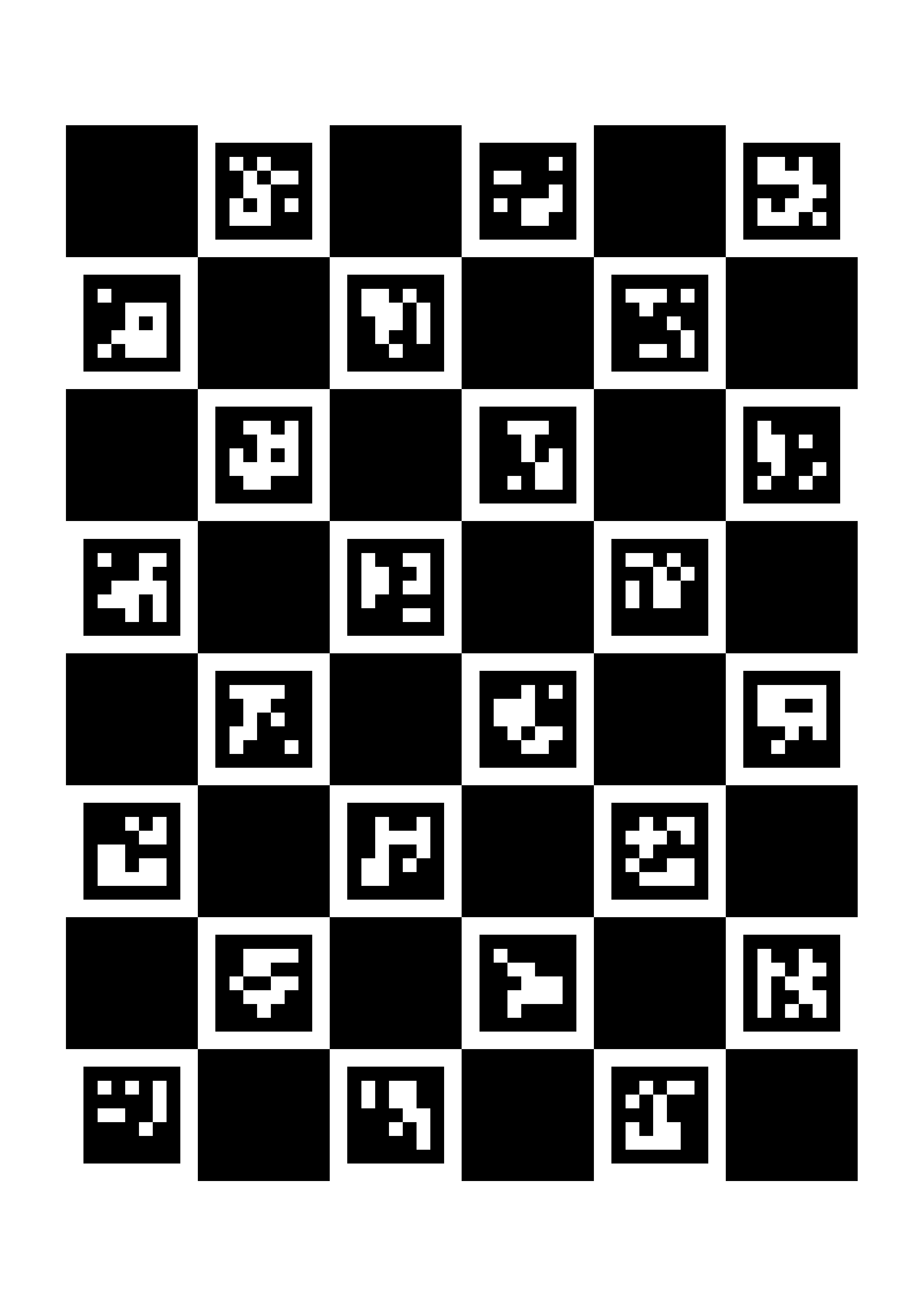
For the first part of the calibration you need to generate the ChAruCo markers, this script generates one you can print on a sheet of A4 paper
import cv2
import numpy as np
import os


# ------------------ Parameters ------------------
SQUARES_X = 6
SQUARES_Y = 8
SQUARE_LENGTH_MM = 30.0
MARKER_LENGTH_MM = 22.0
DPI = 300

# A4 size in mm
A4_WIDTH_MM = 210
A4_HEIGHT_MM = 297

# ------------------ Generate Charuco Board ------------------

FileName = f"charuco_A4_{SQUARES_X}x{SQUARES_Y}_{SQUARE_LENGTH_MM}mm.png"

base_dir = os.path.dirname(os.path.abspath(__file__))
file_path = os.path.join(base_dir, FileName)

# ------------------------------------------------

aruco_dict = cv2.aruco.getPredefinedDictionary(cv2.aruco.DICT_5X5_1000)

board = cv2.aruco.CharucoBoard(
    (SQUARES_X, SQUARES_Y),
    SQUARE_LENGTH_MM,
    MARKER_LENGTH_MM,
    aruco_dict
)

# Convert mm → pixels
def mm_to_px(mm):
    return int(mm * DPI / 25.4)

board_width_px = mm_to_px(SQUARES_X * SQUARE_LENGTH_MM)
board_height_px = mm_to_px(SQUARES_Y * SQUARE_LENGTH_MM)

a4_width_px = mm_to_px(A4_WIDTH_MM)
a4_height_px = mm_to_px(A4_HEIGHT_MM)

# Create white A4 canvas
canvas = np.ones((a4_height_px, a4_width_px), dtype=np.uint8) * 255

# Draw board
board_img = board.generateImage(
    (board_width_px, board_height_px),
    marginSize=0,
    borderBits=1
)

# Center board on A4
y_offset = (a4_height_px - board_height_px) // 2
x_offset = (a4_width_px - board_width_px) // 2

canvas[y_offset:y_offset+board_height_px,
       x_offset:x_offset+board_width_px] = board_img

# Save
cv2.imwrite(file_path, canvas)

print("Saved: charuco_A4_6x8_30mm.png")
If you want to use this code for a different size of paper, you can change the parameters, but the current parameters are the best I think for A4 paper size
here is an example of how the ChAruCo should look
Make Calibration Photos
Make about 20-30 photos from the ChAruCo board using the camera, this is so we can estimate and correct lens distortion of the camera
Here is an example code,
# -*- coding: utf-8 -*-
"""
english:
Camera Calibration using standard Webcam
press 's' to make a picture
press 'q' to stop

dutch:
Camera-kalibratie met standaard webcam.
Druk op 's' om een foto te maken.
Druk op 'q' om te stoppen.
"""

import cv2
import os
import numpy as np

# kalibratiefoto’s folder
foto_pad = "Photos"
base_dir = os.path.dirname(os.path.abspath(__file__))
PhotoPath = os.path.join(base_dir, foto_pad, "Calibration_Photos")  # Combine base_dir and foto_pad
os.makedirs(PhotoPath, exist_ok=True)         # Create the folder

camera_index = 0        # default camera
camera = cv2.VideoCapture(camera_index)

if not camera.isOpened():
    print("Couldnt find the camera, try with different camera index")
    exit()

# Request 720p (1280x720)
# Camera Setup
desired_width = 1280
desired_height = 720
focus = 53
cur_w = int(camera.get(cv2.CAP_PROP_FRAME_WIDTH))
cur_h = int(camera.get(cv2.CAP_PROP_FRAME_HEIGHT))
camera.set(cv2.CAP_PROP_AUTOFOCUS, 0) # turn the autofocus off
camera.set(cv2.CAP_PROP_FOCUS, focus)
print(f"Camera opened with default resolution: {cur_w}x{cur_h}")

# Try to set the desired resolution and read back what the camera actually accepted
camera.set(cv2.CAP_PROP_FRAME_WIDTH, desired_width)
camera.set(cv2.CAP_PROP_FRAME_HEIGHT, desired_height)
set_w = int(camera.get(cv2.CAP_PROP_FRAME_WIDTH))
set_h = int(camera.get(cv2.CAP_PROP_FRAME_HEIGHT))
if set_w == desired_width and set_h == desired_height:
    print(f"Camera resolution set to {set_w}x{set_h}")
else:
    print(f"Requested {desired_width}x{desired_height}, camera reports {set_w}x{set_h} (may not support requested size)")


camera.set(cv2.CAP_PROP_AUTO_EXPOSURE, 0.25)  # manual mode (varies by backend)
camera.set(cv2.CAP_PROP_EXPOSURE, -10)         # try values like -4 to -10
camera.set(cv2.CAP_PROP_GAIN, 0)
camera.set(cv2.CAP_PROP_AUTO_WB, 0)


camera.set(cv2.CAP_PROP_BRIGHTNESS, 128)  # range often 0.0–1.0
camera.set(cv2.CAP_PROP_CONTRAST, 220)

# Simple camera calibration capture script
# (minimal behavior: set resolution, show preview, save photos with 's', quit with 'q')

Photo_Counter = 0
Picture_Amount = 40
# Flag to avoid repeating the "no camera image" message every loop
no_frame_msg_shown = False

print("=== Camera Kalibratie ===")
print("Press S to save current frame as an image")
print("Press Q to stop.\n")

while True:
    ret, frame = camera.read()

    if not ret:
        # Print the warning only once to avoid spamming the console
        if not no_frame_msg_shown:
            print("No camera image, trying again...")
            no_frame_msg_shown = True
        continue  # Continue to next Iteration
    else:
        # Reset the flag once we successfully get a frame
        no_frame_msg_shown = False

    # frame = cv2.cvtColor(frame, cv2.COLOR_BGR2GRAY)

    # # Gamma correction
    # gamma = 0.5  # <1 darkens shadows
    # invGamma = 1.0 / gamma
    # table = np.array([((i / 255.0) ** invGamma) * 255 for i in np.arange(256)]).astype("uint8")
    # frame_shown = cv2.LUT(frame, table)

    frame_shown = frame.copy()

    # Show status on frame
    tekst = f"Photos made: {Photo_Counter}/{Picture_Amount}"
    # Use red (0, 0, 255) until the target is reached, then show green (0, 255, 0)
    kleur = (0, 0, 255) if Photo_Counter < Picture_Amount else (0, 255, 0)
    cv2.putText(frame_shown, tekst, (30, 50), cv2.FONT_HERSHEY_SIMPLEX, 1, kleur, 2)

    # Show status on frame
    tekst = f"Photos made: {Photo_Counter}/{Picture_Amount}"
    # Use red (0, 0, 255) until the target is reached, then show green (0, 255, 0)
    kleur = (0, 0, 255) if Photo_Counter < Picture_Amount else (0, 255, 0)
    cv2.putText(frame_shown, tekst, (30, 50), cv2.FONT_HERSHEY_SIMPLEX, 1, kleur, 2)

    # Show Camera Images
    cv2.imshow("CalibrationCamera", frame_shown)

    # Wait for keyboard input
    key = cv2.waitKey(1) & 0xFF

    if key == ord('s'):
        # Save using the absolute PhotoPath to ensure files go into the intended folder
        filename = os.path.join(PhotoPath, f"calib_{Photo_Counter:02d}.jpg")
        cv2.imwrite(filename, frame)
        Photo_Counter += 1
        print(f"Foto {Photo_Counter}/{Picture_Amount} saved as {filename}")
        # Print the saved image size (width x height) so you can confirm resolution
        h, w = frame.shape[:2]
        print(f"Saved image resolution: {w}x{h}")
        # Short debounce to avoid multiple saves when the key is held down
        cv2.waitKey(250)

        if Photo_Counter >= Picture_Amount:
            print("Alle foto's zijn gemaakt!")


    elif key == ord('q'):
        print("\nKalibratie stoppen.")
        break

    elif key == ord('p'):
        focus += 1  # min: 0, max: 255, increment:5
        print(focus)

    elif key == ord('m'):
        focus -= 1  # min: 0, max: 255, increment:5
        print(focus)

    camera.set(cv2.CAP_PROP_FOCUS, focus)

camera.release()
cv2.destroyAllWindows()
In this code, there is a part that enables higher resolution, the default for opencv is 640x480, but by changing desired_width and desired_height you can get a higher resolution, this is in pixels
P and M to change the focus of the camera, then once the focus is correctly set, make the pictures, make sure that the ChAruCo Board is in multiple places, the camera has to see at least 60% of the ChAruCo board for the calibration
Calibration
The calibration itself is done using 2 parts, part 1 is using the images of the ChAruCo Board you made in the previous step, part 2 is making the homography used to turn pixel coordinates into real world coordinates.
Grab a pen or something with a point you can use to get as a reference point, CalibrationHeight is the Z height of the reference plane used to compute the homography. This value is in mm.
You also have 4 Booleans,
keep_old_camera_matrix_and_dist
this one is to keep the old camera matrix and Dist values from the old calibrationData.npz file, if you want to replace the old one, put this to false, if you don’t already have a calibrationData.npz file, this Boolean will do nothing
add_old_points
if this Boolean is set to True, it will read calibrationData.npz and will add the calibration points that are already inside the file to the new one, if calibrationData.npz doesn’t exist, it will do nothing
list_point_addition
this activates a part of the code that allows adding points in arrays, it has 2 arrays, the pixel and world array, add the points by getting the pixel coordinates in the pixel list and the world coordinates in the world list, the ones with the same index are linked to each other (so pixel_points_manual[3] is linked to world_points_manual[3])
in the list are currently just some example coordinates
Camera_point_addition
This adds points by using the camera, I recommend using this way as the main way to add the points, for this I recommend 9 points, in a 3x3 grid, more is also possible, 4 is the minimum amount, put the pen or other reference point down in the view of the camera, click on it in the camera, and then put in the x coordinates of the robots, then the y coordinates of the robot, repeat for all 9 points then press q and you’re done with the calibration part
Calibration code:
# -*- coding: utf-8 -*-
"""
    english:
    this script performs camera calibration using a checkerboard pattern
    and uses in world points and pixel points to compute the homography matrix.
    the real world coordinates can be collected via the old coordinates, mouse clicks on the camera feed or just manual input.
    the calibration data is saved in a .npz file for later use.

    dutch:
    dit script voert camerakalibratie uit met behulp van een schaakbordpatroon
    en gebruikt wereldpunten en pixelpunten om de homografiematrix te berekenen.
    de echte wereldcoördinaten kunnen worden verzameld via de oude coördinaten, muisklikken op de camerafeed of gewoon handmatige invoer.
    de kalibratiegegevens worden opgeslagen in een .npz-bestand voor later gebruik.

"""

import cv2 as cv
import numpy as np
import glob
import os

# ==================== configuration =====================
# file and folder names
Photo_files = "Calibration_Photos"
Detected_Photos = "Detected_Photos"
penPoint_Photos = "penPoint_Photos"
file_name = "calibrationData.npz"

# select camera index (0 for default camera, 1 for external camera, etc.)
camera_index = 0        # default camera

# Calibration height in mm (used for scaling if needed)
CalibrationHeight = 5

# configuration for point addition
add_old_points = False
list_point_addition = False
Camera_point_addition = True

# configuration for clicked points appearance, wont do anything if camera_point_addition is False
dot_radius = 1                # 🔴 adjust dot size here
dot_color = (255, 0, 0)       # color of the dot in BGR
dot_thickness = -1            # filled circle

# minimum number of valid images needed for calibration
needed_images = 5

# When True, keep the camera matrix and distortion coefficients
# found in the existing calibration file instead of forcing a re-calibration
keep_old_camera_matrix_and_dist = False

# ===================================================================


# ===================== setup paths =====================
# Get the directory where the current script is located
base_dir = os.path.dirname(os.path.abspath(__file__))

# builds a path to a file in that directory
file_path = os.path.join(base_dir, file_name)
Photo_path = os.path.join(base_dir, "Photos_new", Photo_files)
Detected_Photos_path = os.path.join(base_dir, "Photos_new", Detected_Photos)
penPoint_Photos_path = os.path.join(base_dir, "Photos_new", penPoint_Photos)

# ===================================================================


# ================== chekerboard calibration ========================

# checkerboard parameters
Corners = (9, 9) # Aantal INTERNE hoekpunten
SquareSize = 19 # Fysieke grootte van een vierkant in mm

# Calibration function
def Checkerboard_Calibration():
    """
        Calibration using the checkerboard pattern
    """

    # Print Start calibration
    print("\n" + "="*40)
    print("=== START CAMERA CALIBRATION ===")
    print("="*40)

    # 3D coordinates from the objectspoints (world coordinates)
    objp = np.zeros((Corners[0] * Corners[1], 3), np.float32)
    objp[:, :2] = np.mgrid[0:Corners[0], 0:Corners[1]].T.reshape(-1, 2)
    objp *= SquareSize

    # Arrays to store object points and image points from all the images.
    object_points = []
    image_points = []
    frame_grootte = None
    frame_grootte_new = None

    # array with the path to all calibration photos
    path_wildcard = os.path.join(Photo_path, "calib_*.jpg")
    Calibration_Photos_folder = glob.glob(path_wildcard)

    # Check if any calibration photos were found
    if not Calibration_Photos_folder:
        print(f"❌ ERROR: No Calibration Photos found in '{Photo_path}'!")
        return None, None

    print(f"✅ {len(Calibration_Photos_folder)} Calibration Photos found. Started processing.")

    # Process each calibration photo
    for i, fname in enumerate(Calibration_Photos_folder):
        # read the image
        img = cv.imread(fname)

        # Check if image was loaded successfully
        if img is None: continue

        # Convert to grayscale
        gray = cv.cvtColor(img, cv.COLOR_BGR2GRAY)

        # Store frame size from the image
        if frame_grootte is None:
            frame_grootte_new = gray.shape[::-1]

        # Check for consistent image size
        if frame_grootte is not None and frame_grootte != frame_grootte_new:
            print(f"⚠️ WARNING: Image {fname} has a different size ({gray.shape[::-1]}) than previous images ({frame_grootte}). Skipping this image.")
            continue

        frame_grootte = frame_grootte_new

        # Find the checkerboard corners
        ret, hoeken = cv.findChessboardCorners(gray, Corners, None)

        if ret:
            criteria = (cv.TERM_CRITERIA_EPS + cv.TERM_CRITERIA_MAX_ITER, 30, 0.001)
            hoeken_subpix = cv.cornerSubPix(gray, hoeken, (11, 11), (-1, -1), criteria)

            object_points.append(objp)
            image_points.append(hoeken_subpix)

            img_text = img.copy()
            cv.drawChessboardCorners(img_text, Corners, hoeken_subpix, ret)
            os.makedirs(Photo_path, exist_ok=True)
            cv.imwrite(os.path.join(Detected_Photos_path, f"detected_{i:02d}.jpg"), img_text)

    if len(object_points) < needed_images or frame_grootte is None:
        print(f"\n❌ ERROR: Not enough usable patterns ({len(object_points)} / {needed_images}) found for calibration.")
        return None, None

    # calibrate the camera
    print(f"\n🛠️ calibration started with {len(object_points)} images...")
    ret, camera_matrix, dist_coeffs, rvecs, tvecs = cv.calibrateCamera(
        object_points, image_points, frame_grootte, None, None
    )

    print("\n" + "="*40)
    print("=== KALIBRATIE VOLTOOID! ===")
    print("="*40)

    # Toon de matrix na kalibratie
    print("\n[CAMERA MATRIX (mtx) - Zojuist berekend]")
    print(camera_matrix)

    return camera_matrix, dist_coeffs

# ==================== ChArUco Parameters =====================
CHARUCO_SQUARES_X = 6      # number of chessboard squares (X)
CHARUCO_SQUARES_Y = 8      # number of chessboard squares (Y)
SQUARE_LENGTH = 30.0       # mm
MARKER_LENGTH = 22.0       # mm (must be smaller than square)
ARUCO_DICT = cv.aruco.DICT_5X5_1000

def Charuco_Calibration():
    """
        Calibration using a ChArUco board
    """
    print("\n" + "="*40)
    print("=== START CHARUCO CAMERA CALIBRATION ===")
    print("="*40)

    # --- Create ChArUco board ---
    aruco_dict = cv.aruco.getPredefinedDictionary(ARUCO_DICT)
    board = cv.aruco.CharucoBoard(
        (CHARUCO_SQUARES_X, CHARUCO_SQUARES_Y),
        SQUARE_LENGTH,
        MARKER_LENGTH,
        aruco_dict
    )

    charuco_corners_all = []
    charuco_ids_all = []
    imageSize = None

    # Get images
    path_wildcard = os.path.join(Photo_path, "calib_*.jpg")
    Calibration_Photos_folder = glob.glob(path_wildcard)

    if not Calibration_Photos_folder:
        print(f"❌ ERROR: No Calibration Photos found in '{Photo_path}'!")
        return None, None

    print(f"✅ {len(Calibration_Photos_folder)} Calibration Photos found. Started processing.")

    for i, fname in enumerate(Calibration_Photos_folder):
        img = cv.imread(fname)
        if img is None:
            continue

        gray = cv.cvtColor(img, cv.COLOR_BGR2GRAY)
        imageSize = gray.shape[::-1]

        # --- Detect ArUco markers ---
        corners, ids, _ = cv.aruco.detectMarkers(gray, aruco_dict)

        if ids is None or len(ids) < 4:
            continue

        # --- Interpolate ChArUco corners ---
        retval, charuco_corners, charuco_ids = cv.aruco.interpolateCornersCharuco(
            corners, ids, gray, board
        )

        if retval < 20:
            continue

        charuco_corners_all.append(charuco_corners)
        charuco_ids_all.append(charuco_ids)

        # --- Visualization ---
        img_draw = img.copy()
        cv.aruco.drawDetectedMarkers(img_draw, corners, ids)
        cv.aruco.drawDetectedCornersCharuco(img_draw, charuco_corners, charuco_ids)

        os.makedirs(Detected_Photos_path, exist_ok=True)
        cv.imwrite(os.path.join(Detected_Photos_path, f"detected_{i:02d}.jpg"), img_draw)

    if len(charuco_corners_all) < 5 or imageSize is None:
        print(f"\n❌ FOUT: Onvoldoende bruikbare patronen ({len(charuco_corners_all)}/<5).")
        return None, None

    # --- Calibration ---
    print(f"\n🛠️ Kalibratie gestart met {len(charuco_corners_all)} beelden...")

    ret, camera_matrix, dist_coeffs, rvecs, tvecs = cv.aruco.calibrateCameraCharuco(
        charucoCorners=charuco_corners_all,
        charucoIds=charuco_ids_all,
        board=board,
        imageSize=imageSize,
        cameraMatrix=None,
        distCoeffs=None
    )

    print("\n" + "="*40)
    print("=== CHARUCO CALIBRATION COMPLETED! ===")
    print("="*40)

    print("\n[CAMERA MATRIX]")
    print(camera_matrix)

    return camera_matrix, dist_coeffs

def getOldPoints():
    """
        get old values from the npz file (always return numpy arrays)
    """
    if os.path.exists(file_path):
        Data = np.load(file_path)
        pixel_points_old = Data["pixel_points"] if "pixel_points" in Data else np.empty((0, 2))
        world_points_old = Data["world_points"] if "world_points" in Data else np.empty((0, 2))
    else:
        pixel_points_old = np.empty((0, 2))
        world_points_old = np.empty((0, 2))

    return np.asarray(pixel_points_old), np.asarray(world_points_old)

def getManualPoints():
    """
        get manual input points (always return lists)
        manually put points here in the pixel_points_manual and world_points_manual lists
    """
    pixel_points_manual = [
    [457, 297],
    [427, 55],
    [513, 230],
    [577, 470],
    [570, 13],
    [601, 284],
    [526, 393],
    [407, 441],
    [128, 467],
    [302, 460],
    [92, 66],
    [197, 231],
    [155, 385],
    [223, 94],
    [341, 242]
    ]

    world_points_manual = [
    [-867.06, -206.98],
    [-521.58, -170.11],
    [-774.11, -280.02],
    [-1105.0, -370.90],
    [-464.78, -371.65],
    [-847.33, -400.19],
    [-997.57, -297.69],
    [-1062.17, -135.8],
    [-1108.99, 252.73],
    [-1088.72, 6.97],
    [-544.43, 300.34],
    [-772.21, 153.60],
    [-987.73, 208.38],
    [-583.33, 118.17],
    [-790.10, -47.88],
    ]

    # Validate lengths
    if len(pixel_points_manual) != len(world_points_manual):
        print("❌ ERROR: The number of manual pixel points does not match the number of world points.")
        return [], []

    return pixel_points_manual, world_points_manual


def getCameraPoints(camera_matrix, dist_coeffs):
    pixel_points_camera = []
    world_points_camera  = []
    clicked_point = []

    i = 0

    def click_event(event, x, y, flags, param):
        if event == cv.EVENT_LBUTTONDOWN:
            print(f"Clicked pixel coordinates: x={x}, y={y}")
            param.append([x, y])

    camera = cv.VideoCapture(camera_index)
    if not camera.isOpened():
        print("Cannot open camera")
        exit()

    desired_width = 1280
    desired_height = 720
    focus = 53
    cur_w = int(camera.get(cv.CAP_PROP_FRAME_WIDTH))
    cur_h = int(camera.get(cv.CAP_PROP_FRAME_HEIGHT))
    camera.set(cv.CAP_PROP_AUTOFOCUS, 0) # turn the autofocus off
    camera.set(cv.CAP_PROP_FOCUS, focus)
    print(f"Camera opened with default resolution: {cur_w}x{cur_h}")

    camera.set(cv.CAP_PROP_AUTO_EXPOSURE, 0.25)  # manual mode (varies by backend)
    camera.set(cv.CAP_PROP_EXPOSURE, -5)         # try values like -4 to -10

    # Try to set the desired resolution and read back what the camera actually accepted
    camera.set(cv.CAP_PROP_FRAME_WIDTH, desired_width)
    camera.set(cv.CAP_PROP_FRAME_HEIGHT, desired_height)
    set_w = int(camera.get(cv.CAP_PROP_FRAME_WIDTH))
    set_h = int(camera.get(cv.CAP_PROP_FRAME_HEIGHT))
    if set_w == desired_width and set_h == desired_height:
        print(f"Camera resolution set to {set_w}x{set_h}")
    else:
        print(f"Requested {desired_width}x{desired_height}, camera reports {set_w}x{set_h} (may not support requested size)")

    cv.namedWindow("Camera")
    cv.setMouseCallback("Camera", click_event, clicked_point)
    print("Click points on the camera feed. Press 'q' to quit.")

    while True:
        ret, frame = camera.read()
        if not ret:
            print("Failed to grab frame")
            break
        image = frame.copy()
        # Apply undistortion only if a valid calibration was provided
        if camera_matrix is not None and dist_coeffs is not None:
            frame = cv.undistort(frame, camera_matrix, dist_coeffs)
        # Draw already added points
        for pt in pixel_points_camera:
            cv.circle(frame, tuple(pt), 3, (0, 0, 255), -1)
        cv.imshow("Camera", frame)
        key = cv.waitKey(1) & 0xFF
        if key == ord('q'):
            break

        # Process the click (only one at a time)
        if clicked_point:
            pt = clicked_point[0]
            image_dot = cv.circle(
                image,
                center=pt,
                radius=dot_radius,
                color=dot_color,
                thickness=dot_thickness
            )
            try:
                X = float(input("Enter corresponding world X coordinate: "))
                Y = float(input("Enter corresponding world Y coordinate: "))
                os.makedirs(penPoint_Photos_path, exist_ok=True)
                cv.imwrite(os.path.join(penPoint_Photos_path, f"image_{i:02}_{X:04}_{Y:04}.jpg"), image_dot)
                pixel_points_camera.append(pt)
                world_points_camera.append([X, Y])
                print(f"✅ Added pixel {pt} → world [{X}, {Y}]")
                i += 1
            except ValueError:
                print("❌ Invalid input, you need to click again.")
            finally:
                clicked_point.clear()  # Reset after handling, valid or not

    camera.release()
    cv.destroyAllWindows()
    return pixel_points_camera, world_points_camera

def pixel_and_world_points(camera_matrix, dist_coeffs):
    if add_old_points == True:
        pixel_points_old, world_points_old = getOldPoints()
    else:
        pixel_points_old = np.empty((0, 2))
        world_points_old = np.empty((0, 2))

    if list_point_addition == True:
        pixel_points_manual, world_points_manual = getManualPoints()
    else:
        pixel_points_manual = []
        world_points_manual = []

    if Camera_point_addition == True:
        pixel_points_camera, world_points_camera = getCameraPoints(camera_matrix, dist_coeffs)
    else:
        pixel_points_camera = []
        world_points_camera = []

    pixel_array = pixel_points_old.tolist() + pixel_points_manual + pixel_points_camera
    world_array = world_points_old.tolist() + world_points_manual + world_points_camera

    return pixel_array, world_array


# --- Hoofdprogramma ---

if __name__ == "__main__":
    # Initialize
    camera_matrix = None
    dist_coeffs = None

    # Try to load existing calibration
    if os.path.exists(file_path):
        Data = np.load(file_path)
        camera_matrix_loaded = Data["camera_matrix"] if "camera_matrix" in Data else None
        dist_coeffs_loaded = Data["dist_coeffs"] if "dist_coeffs" in Data else None

        if keep_old_camera_matrix_and_dist and camera_matrix_loaded is not None and dist_coeffs_loaded is not None:
            camera_matrix = camera_matrix_loaded
            dist_coeffs = dist_coeffs_loaded
            print(f"✅ Loaded camera matrix and distortion from '{file_path}'.")
        else:
            print("🔁 Re-running camera calibration (kept loaded: {})".format(keep_old_camera_matrix_and_dist))
            camera_matrix, dist_coeffs = Charuco_Calibration()
    else:
        # If the file does not exist, run calibration
        print(f"⚠️ Calibration file ({file_path}) not found. Start calibration.")
        camera_matrix, dist_coeffs = Charuco_Calibration()

    # Validate calibration
    if camera_matrix is None or dist_coeffs is None:
        print("❌ No valid camera calibration available. Aborting.")
        raise SystemExit(1)

    # pixel and world points
    pixel_points, world_points = pixel_and_world_points(camera_matrix, dist_coeffs)

    # Convert to numpy array
    p = np.array(pixel_points)
    w = np.array(world_points)

    H_cal = None
    if p.shape[0] >= 4 and w.shape[0] >= 4 and p.shape == w.shape:
        H_cal, mask = cv.findHomography(p, w)
        if H_cal is None:
            print("❌ findHomography failed to compute a valid homography.")
    else:
        print("⚠️ Not enough matching points to compute homography (need at least 4). Skipping H_cal.")

    # Save to .npz file (update or create)
    save_dict = dict(
        CalibrationHeight=CalibrationHeight,
        pixel_points=p,
        world_points=w,
        H_cal=H_cal
    )
    if camera_matrix is not None:
        save_dict["camera_matrix"] = camera_matrix
    if dist_coeffs is not None:
        save_dict["dist_coeffs"] = dist_coeffs

    np.savez(file_path, **save_dict)
    print(f"✅ Saved calibration data to '{file_path}'.")
Transform pixel coordinates to world coordinates
Here is a code that is being used for turning pixel coordinates into world coordinates
# imports
import os
import numpy as np
import cv2 as cv

CalibrationFile = "calibrationData.npz"

# -------- Settings -------------
Plate_Thickness = 5
Platform_Thickness = 0


# --- LOAD CALIBRATION ---
def get_calibration_data():
    base_dir = os.path.dirname(os.path.abspath(__file__))
    calib_path = os.path.join(base_dir, CalibrationFile)
    CalibrationData = np.load(calib_path)

    CalibrationHeight = CalibrationData["CalibrationHeight"]
    H_cal = CalibrationData["H_cal"]

    return CalibrationHeight, H_cal

def pixel_to_world_simple(pixelCoordinates):
    """
        convert pixel coordinates to world coordinates using calibration data on a single plane.
    """
    _, H_cal = get_calibration_data()

    points = np.array([pixelCoordinates], dtype='float32')  # single point
    points = np.array([points])  # must be in shape (1, N, 2)

    robot_coordinates = cv.perspectiveTransform(points, H_cal)

    x = robot_coordinates[0, 0, 0]
    y = robot_coordinates[0, 0, 1]

    return x,y

def pixel_to_world(Coordinates, Z_new = 5, H_camera = 950, image_width = 640, image_height = 480):
    """

        Convert pixel coordinates to world coordinates at a specified target height.

        Args:
        Coordinates (tuple[float, float]): Coordinates in (x, y)
            Assumes origin (0, 0) at the top-left corner of the image.
        Z_new (float): Z-Height of new coordinates, default is 5 (height of the calibration)
        image_width (int, optional): Width of image in pixels, default is 640
        image_height (int, optional): Height of image in pixels, default is 480

        Returns:
        tuple[float, float]: (X, Y) world coordinates corresponding to the input pixel.

        Example usage:
        x_world, y_world = pixel_to_world_V2((x_px, y_px), Z_new)
        x_world, y_world = pixel_to_world_V2((x_px, y_px), Z_new, 1920, 1080)

    """
    CalibrationHeight, H_cal = get_calibration_data()

    # find camera center in world coordinates
    center_pts = np.array([[(image_width // 2, image_height // 2)]], dtype=np.float32)
    camera_world_x, camera_world_y = cv.perspectiveTransform(center_pts, H_cal)[0, 0]

    print ("Camera center in world coordinates:", camera_world_x, camera_world_y)

    # project pixel to calibration plane
    pts = np.array([[Coordinates]], dtype=np.float32)
    x_cal, y_cal = cv.perspectiveTransform(pts, H_cal)[0, 0]

    # compute correct perspective scale
    D_cal = H_camera - CalibrationHeight
    D_new = H_camera - Z_new
    scale = D_new / D_cal

    # scale around camera center in world coordinates
    X = camera_world_x + (x_cal - camera_world_x) * scale
    Y = camera_world_y + (y_cal - camera_world_y) * scale

    # convert to meter
    X = X/1000
    Y = Y/1000

    return X, Y

if __name__ == "__main__":
    # --- TESTING THE FUNCTION ---
    pixel2 = [640, 360]
    z_new = Plate_Thickness + Platform_Thickness

    x_r, y_r = pixel_to_world(pixel2)
    x_r2, y_r2 = pixel_to_world(pixel2, z_new, image_width = 1280, image_height = 720)

    print(x_r, y_r)
    print(x_r2, y_r2)
This one works in 3 dimensions, x, y and z
Coordinates is (x,y) pixelcoordinates you want to change into the world coordinates,
Z_new is the z height you are working at, this is in mm
H_camera is the z height of the camera, this is in mm,
image_width and image_height are the width and the height of the image of the camera you are working with, in pixels, make sure it is exactly the same as the one you used the calibration with
theory behind the pixel to world coordinates:
first i it projects the pixel onto a reference plane, then it uses that and some math to calculate the new coordinates, it uses the distance to the center of the plane to calculate the new coordinates
it uses similar triangles to get the new scaled distance to the point from the center of the plane, then uses that to get the coordinate
scaled distance = distance / cameraHeight * (cameraHeight – Z_height)
in the if __name__ == "__main__": part it shows example usage
the simple version just works in a single plane, the other one works on different z heights too