Based on contributions by LoukasLeftheriotis.
Standard OpenCV chessboard calibration removes lens distortion and gives you a camera matrix. Combined with a known chessboard square size, you can then turn a measured pixel distance into a real-world distance in millimetres — useful for measuring or sizing objects. This is not the same problem as finding a pick point’s X/Y location; for that, see How to calibrate a camera and map pixels to world coordinates with a ChArUco board or How to map camera coordinates to robot coordinates with a least-squares fit.
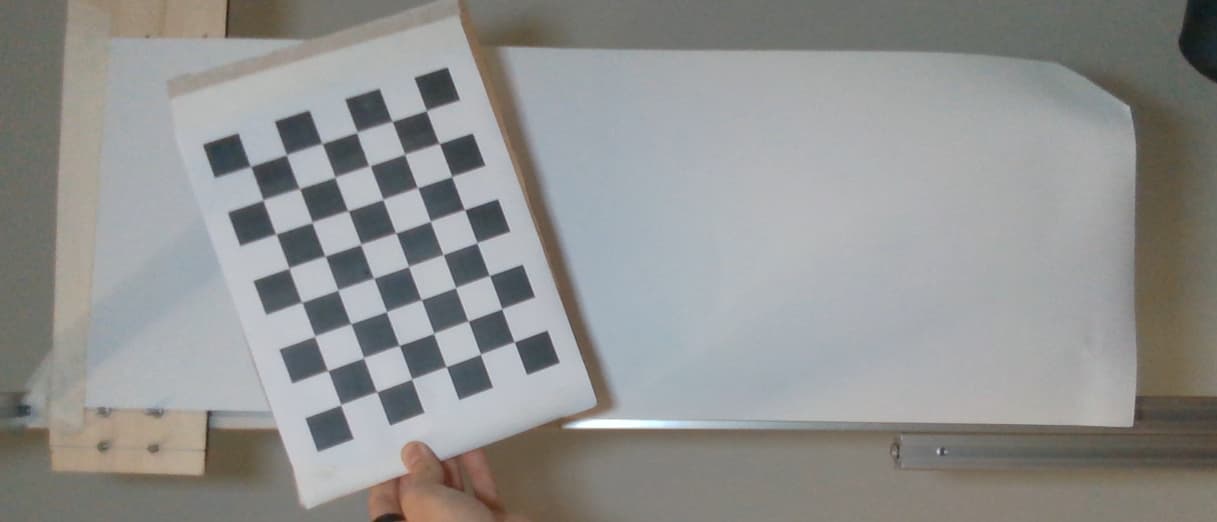
What you need
- A printable chessboard pattern and a printer.
- The camera you want to calibrate.
- Python with
opencv-pythonandnumpy. - 15-20+ photos of the printed chessboard from different angles and distances.
Steps
1. Generate a printable chessboard image
import cv2 as cv
import numpy as np
import os

def generate_chessboard_image(square_size=25, chessboard_size=(8, 6), image_size=(200, 250), output_path='./images/calibration_chessboard.png'):
    chessboard_image = np.ones(image_size, dtype=np.uint8) * 255
    square_color = 0

    chessboard_width = chessboard_size[0] * square_size
    chessboard_height = chessboard_size[1] * square_size
    x_offset = (image_size[1] - chessboard_width) // 2
    y_offset = (image_size[0] - chessboard_height) // 2

    for i in range(chessboard_size[1]):
        for j in range(chessboard_size[0]):
            if (i + j) % 2 == 0:
                top_left = (x_offset + j * square_size, y_offset + i * square_size)
                bottom_right = (x_offset + (j + 1) * square_size, y_offset + (i + 1) * square_size)
                cv.rectangle(chessboard_image, top_left, bottom_right, square_color, -1)

    os.makedirs(os.path.dirname(output_path), exist_ok=True)
    cv.imwrite(output_path, chessboard_image)
    print(f"Chessboard saved to {output_path}")

generate_chessboard_image()
The default image_size is a small preview — increase it (and square_size) if you want a bigger printed board. Print at 100% scale; scaling in the print dialog throws off square_size.
2. Take calibration photos
Photograph the printed chessboard with the camera you’re calibrating, from a wide variety of angles and distances, and save them as .png files in your images folder.
3. Calibrate the camera
import numpy as np
import cv2 as cv
import glob
import json
import os

chessboardSize = (8, 6)  # inner corner count per row and column of YOUR printed board
frameSize = (1920, 1080)  # resolution of your calibration images
size_of_chessboard_squares_mm = 25

criteria = (cv.TERM_CRITERIA_EPS + cv.TERM_CRITERIA_MAX_ITER, 30, 0.001)

objp = np.zeros((chessboardSize[0] * chessboardSize[1], 3), np.float32)
objp[:, :2] = np.mgrid[0:chessboardSize[0], 0:chessboardSize[1]].T.reshape(-1, 2) * size_of_chessboard_squares_mm

objpoints = []
imgpoints = []

folder_path = './images'
os.makedirs(folder_path, exist_ok=True)

images = glob.glob(os.path.join(folder_path, '*.png'))
if not images:
    raise FileNotFoundError("No images found. Make sure your calibration photos are .png files in the images folder.")

detected_images = 0
for image in images:
    img = cv.imread(image)
    gray = cv.cvtColor(img, cv.COLOR_BGR2GRAY)

    _, binary = cv.threshold(gray, 127, 255, cv.THRESH_BINARY | cv.THRESH_OTSU)
    ret, corners = cv.findChessboardCorners(binary, chessboardSize,
                                             cv.CALIB_CB_ADAPTIVE_THRESH + cv.CALIB_CB_NORMALIZE_IMAGE + cv.CALIB_CB_FAST_CHECK)

    if ret:
        objpoints.append(objp)
        corners2 = cv.cornerSubPix(gray, corners, (11, 11), (-1, -1), criteria)
        imgpoints.append(corners2)
        detected_images += 1

        cv.drawChessboardCorners(img, chessboardSize, corners2, ret)
        cv.imshow('Detected Corners', img)
        cv.waitKey(500)
        print(f"Chessboard corners detected in {image}")
    else:
        print(f"Warning: Chessboard not detected in {image}")

cv.destroyAllWindows()

print(f"Number of images with detected corners: {detected_images}")
if detected_images == 0:
    raise ValueError("No valid chessboard corners detected in any images. Check chessboardSize and your images.")

ret, cameraMatrix, dist, rvecs, tvecs = cv.calibrateCamera(objpoints, imgpoints, frameSize, None, None)
if not ret:
    raise RuntimeError("Camera calibration failed.")

calibration_data = {
    'camera_matrix': cameraMatrix.tolist(),
    'dist_coeffs': dist.tolist(),
    'rvecs': [rv.tolist() for rv in rvecs],
    'tvecs': [tv.tolist() for tv in tvecs]
}
calibration_file_path = os.path.join(folder_path, 'calibration_data.json')
with open(calibration_file_path, 'w') as f:
    json.dump(calibration_data, f)
print(f"Calibration data saved to {calibration_file_path}")

# Reprojection error -- lower is better; well under 1.0 pixel is a good calibration
mean_error = 0
for i in range(len(objpoints)):
    imgpoints2, _ = cv.projectPoints(objpoints[i], rvecs[i], tvecs[i], cameraMatrix, dist)
    error = cv.norm(imgpoints[i], imgpoints2, cv.NORM_L2) / len(imgpoints2)
    mean_error += error
print(f"Total reprojection error: {mean_error / len(objpoints)}")

def undistort_image(image_filename):
    """Undistort an image using the saved camera calibration data."""
    with open(calibration_file_path, 'r') as f:
        calibration_data = json.load(f)
    cameraMatrix = np.array(calibration_data['camera_matrix'])
    dist = np.array(calibration_data['dist_coeffs'])

    img_path = os.path.join(folder_path, image_filename)
    img = cv.imread(img_path)
    if img is None:
        print(f"Image '{image_filename}' not found in {folder_path}")
        return

    h, w = img.shape[:2]
    newCameraMatrix, roi = cv.getOptimalNewCameraMatrix(cameraMatrix, dist, (w, h), 1, (w, h))
    dst = cv.undistort(img, cameraMatrix, dist, None, newCameraMatrix)

    x, y, w, h = roi
    dst = dst[y:y + h, x:x + w]

    undistorted_filename = f"undistorted_{image_filename}"
    cv.imwrite(os.path.join(folder_path, undistorted_filename), dst)
    print(f"Undistorted image saved as {undistorted_filename}")

undistort_image('img0.png')  # replace with any image in your images folder
Check:
chessboardSizeincv.findChessboardCornersmust be the number of inner corners, i.e.(squares_per_row - 1, squares_per_column - 1)of the board you actually printed — not the number of squares. If your printed board has 8×6 squares, setchessboardSize = (7, 5); use(8, 6)only if your board actually has 9×7 squares. Double-check this against your own printed board before relying on this value — a mismatch here meansfindChessboardCornerswill silently fail to find any corners.
4. Convert a pixel distance to a real-world distance
This loads the saved calibration, detects the chessboard again in a reference image to measure how many pixels one square spans, and uses that as a scale factor.
import numpy as np
import json
import cv2 as cv
import os

def pixel_to_real_distance(pixel_distance, image_path, calibration_file_path='./images/calibration_data.json',
                            real_checkerboard_size_mm=25, checkerboard_size=(8, 6)):
    """
    Calculate the real-world distance in mm for a given pixel distance.

    pixel_distance: distance in pixels to convert.
    image_path: path to an image containing the checkerboard pattern (used only to measure the scale).
    calibration_file_path: path to the saved calibration JSON.
    real_checkerboard_size_mm: real-world size of one checkerboard square, in mm.
    checkerboard_size: inner corner count of the checkerboard used for the scale reference.
    """
    if not os.path.exists(calibration_file_path):
        raise FileNotFoundError(f"{calibration_file_path} not found.")
    with open(calibration_file_path, 'r') as f:
        calibration_data = json.load(f)
    camera_matrix = np.array(calibration_data['camera_matrix'])
    dist_coeffs = np.array(calibration_data['dist_coeffs'])

    img = cv.imread(image_path)
    if img is None:
        raise FileNotFoundError(f"Failed to load image at {image_path}")
    gray = cv.cvtColor(img, cv.COLOR_BGR2GRAY)

    ret, corners = cv.findChessboardCorners(gray, checkerboard_size, None)
    if not ret:
        raise Exception("Checkerboard not detected in the image!")

    corners2 = cv.cornerSubPix(gray, corners, (11, 11), (-1, -1),
                                (cv.TERM_CRITERIA_EPS + cv.TERM_CRITERIA_MAX_ITER, 30, 0.001))

    pixel_checkerboard_distance = np.linalg.norm(corners2[0] - corners2[1])
    mm_per_pixel = real_checkerboard_size_mm / pixel_checkerboard_distance
    return pixel_distance * mm_per_pixel
Common mistakes
chessboardSizemismatch. See the Check note above — this is the most common reason findChessboardCornersreturns nothing.- Fewer than ~10-15 good detections. Camera calibration needs enough varied views (different angles, distances, positions in frame) to solve for the lens distortion reliably; if
detected_imagesis low, take more photos with more variation. - Poor lighting or glare on the board. Corner detection is sensitive to uneven lighting and reflections — matte-print the chessboard if possible.
camera_matrixanddist_coeffsfrom this calibration are also exactly what How to calibrate a camera and map pixels to world coordinates with a ChArUco board and How to do high-precision robot-camera calibration with ArUco markers need as their starting point — you don’t need to redo it with ChArUco if you already have this.
Related
- Choosing a method to convert camera pixels to robot coordinates — choosing a calibration method
- How to calibrate a camera and map pixels to world coordinates with a ChArUco board — ChArUco board + homography (for pixel → pick-point location, not just distance)
- How to map camera coordinates to robot coordinates with a least-squares fit — least-squares affine fit
Rewritten and consolidated (Sept 2026) from the original student how-to’s: How to Calibrate a Camera and Convert Pixel Distance to Real-World Distance.