Based on contributions by MathijsCok.
This is the full pipeline: print a ChArUco board, use it to calibrate your camera’s lens (intrinsics + distortion), then collect pixel↔world point pairs to build a homography that converts any pixel on the reference plane into a real-world coordinate. It also covers converting pixels at a different height than the calibration plane.
This article targets OpenCV ≥ 4.7, which introduced the current
cv2.arucoAPI:getPredefinedDictionary(), theCharucoBoard(...)constructor, andboard.generateImage(). Since OpenCV 4.7 thearucomodule ships in the regularopencv-pythonpackage — you no longer needopencv-contrib-pythonjust for ArUco/ChArUco. If you’re on OpenCV 4.6 or older, the equivalent calls arecv2.aruco.Dictionary_get(...)andcv2.aruco.CharucoBoard_create(...)— upgrading OpenCV is easier than adapting this code. Some of the older free functions used below (interpolateCornersCharuco,calibrateCameraCharuco) are marked legacy in recent OpenCV releases in favor of thecv2.aruco.CharucoDetectorclass; if you get anAttributeErroron them, checkcv2.__version__and the OpenCV release notes for your version.
What you need
- A printer (A4) for the ChArUco board.
- A camera you can grab frames from with OpenCV (a USB webcam works; for a RealSense depth camera you can use its color stream the same way, or see How to convert a RealSense camera pixel to a 3D point and robot coordinates for a depth-based alternative).
- Python 3 with
opencv-python≥ 4.7 andnumpy. - A pointed object (pen tip, marker) to use as a physical reference point for the world coordinates.
- A robot (or other way to measure real-world X/Y positions) to build the point list.
Steps
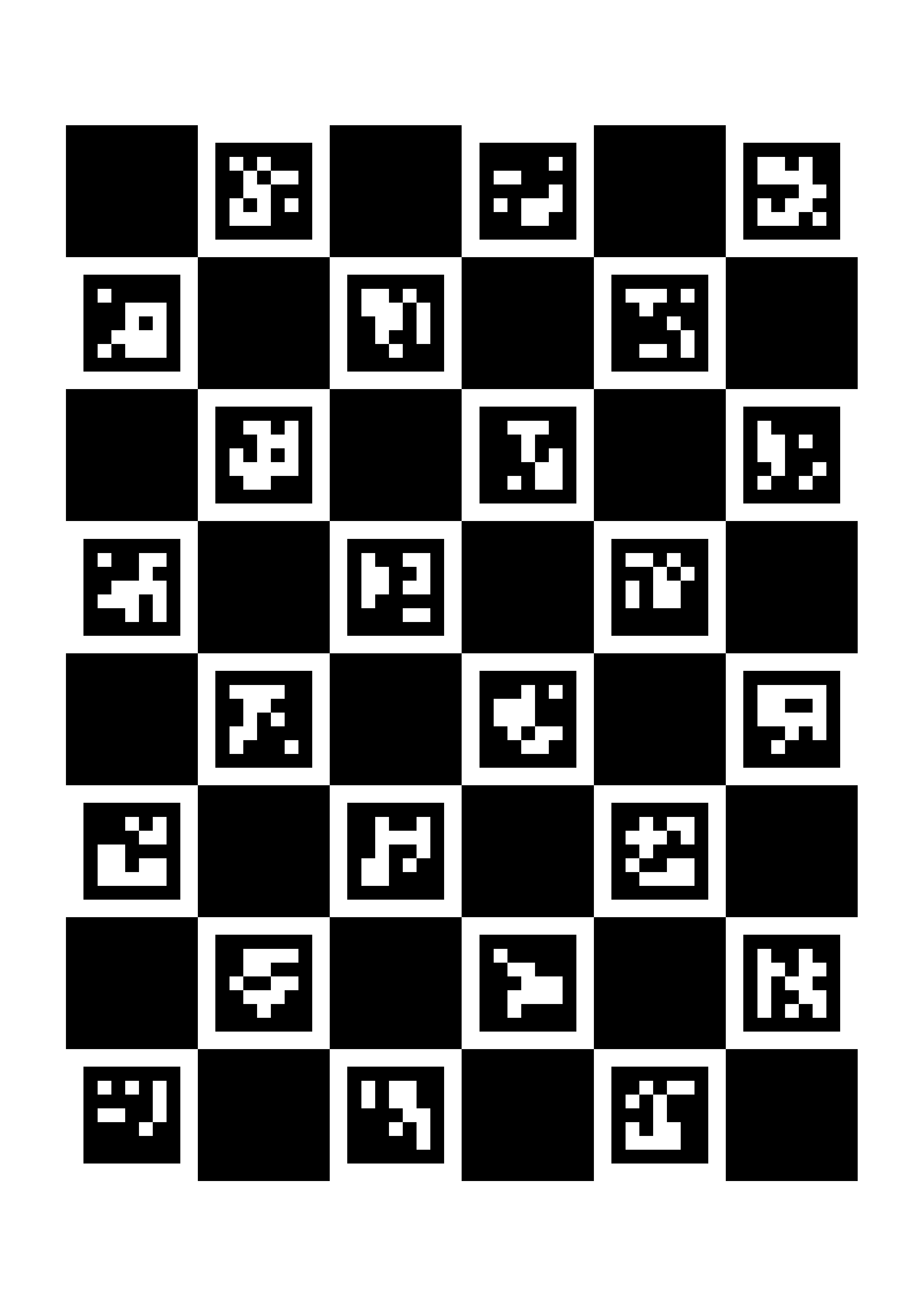
1. Generate the ChArUco board
import cv2
import numpy as np
import os

# ------------------ Parameters ------------------
SQUARES_X = 6
SQUARES_Y = 8
SQUARE_LENGTH_MM = 30.0
MARKER_LENGTH_MM = 22.0
DPI = 300

# A4 size in mm
A4_WIDTH_MM = 210
A4_HEIGHT_MM = 297

# ------------------ Generate Charuco Board ------------------
FileName = f"charuco_A4_{SQUARES_X}x{SQUARES_Y}_{SQUARE_LENGTH_MM}mm.png"
base_dir = os.path.dirname(os.path.abspath(__file__))
file_path = os.path.join(base_dir, FileName)

aruco_dict = cv2.aruco.getPredefinedDictionary(cv2.aruco.DICT_5X5_1000)
board = cv2.aruco.CharucoBoard(
    (SQUARES_X, SQUARES_Y),
    SQUARE_LENGTH_MM,
    MARKER_LENGTH_MM,
    aruco_dict
)

def mm_to_px(mm):
    return int(mm * DPI / 25.4)

board_width_px = mm_to_px(SQUARES_X * SQUARE_LENGTH_MM)
board_height_px = mm_to_px(SQUARES_Y * SQUARE_LENGTH_MM)
a4_width_px = mm_to_px(A4_WIDTH_MM)
a4_height_px = mm_to_px(A4_HEIGHT_MM)

# Create white A4 canvas and center the board on it
canvas = np.ones((a4_height_px, a4_width_px), dtype=np.uint8) * 255
board_img = board.generateImage((board_width_px, board_height_px), marginSize=0, borderBits=1)

y_offset = (a4_height_px - board_height_px) // 2
x_offset = (a4_width_px - board_width_px) // 2
canvas[y_offset:y_offset + board_height_px, x_offset:x_offset + board_width_px] = board_img

cv2.imwrite(file_path, canvas)
print(f"Saved: {FileName}")
Print the result at 100% scale (no “fit to page”) on A4 paper — scaling in the print dialog will throw off SQUARE_LENGTH_MM. If you need a different paper size, adjust the parameters, but the defaults above are tuned for A4.
2. Capture calibration photos
Take 20-30 photos of the printed board from different angles and positions — this is what lets OpenCV estimate and correct lens distortion. The camera needs to see at least 60% of the board in each photo.
import cv2
import os

photo_folder = "Photos"
base_dir = os.path.dirname(os.path.abspath(__file__))
photo_path = os.path.join(base_dir, photo_folder, "Calibration_Photos")
os.makedirs(photo_path, exist_ok=True)

camera_index = 0
camera = cv2.VideoCapture(camera_index)
if not camera.isOpened():
    print("Could not find the camera, try a different camera index")
    exit()

# Camera setup
desired_width = 1280
desired_height = 720
focus = 53
camera.set(cv2.CAP_PROP_AUTOFOCUS, 0)
camera.set(cv2.CAP_PROP_FOCUS, focus)

cur_w = int(camera.get(cv2.CAP_PROP_FRAME_WIDTH))
cur_h = int(camera.get(cv2.CAP_PROP_FRAME_HEIGHT))
print(f"Camera opened with default resolution: {cur_w}x{cur_h}")

camera.set(cv2.CAP_PROP_FRAME_WIDTH, desired_width)
camera.set(cv2.CAP_PROP_FRAME_HEIGHT, desired_height)
set_w = int(camera.get(cv2.CAP_PROP_FRAME_WIDTH))
set_h = int(camera.get(cv2.CAP_PROP_FRAME_HEIGHT))
if set_w == desired_width and set_h == desired_height:
    print(f"Camera resolution set to {set_w}x{set_h}")
else:
    print(f"Requested {desired_width}x{desired_height}, camera reports {set_w}x{set_h} (may not support requested size)")

# These values are backend- and camera-dependent -- tune them for your own camera
camera.set(cv2.CAP_PROP_AUTO_EXPOSURE, 0.25)  # manual mode (varies by backend)
camera.set(cv2.CAP_PROP_EXPOSURE, -10)
camera.set(cv2.CAP_PROP_GAIN, 0)
camera.set(cv2.CAP_PROP_AUTO_WB, 0)
camera.set(cv2.CAP_PROP_BRIGHTNESS, 128)
camera.set(cv2.CAP_PROP_CONTRAST, 220)

photo_counter = 0
picture_amount = 40
no_frame_msg_shown = False

print("=== Camera calibration capture ===")
print("Press S to save the current frame, P/M to adjust focus, Q to stop.\n")

while True:
    ret, frame = camera.read()
    if not ret:
        if not no_frame_msg_shown:
            print("No camera image, trying again...")
            no_frame_msg_shown = True
        continue
    no_frame_msg_shown = False

    frame_shown = frame.copy()
    text = f"Photos made: {photo_counter}/{picture_amount}"
    color = (0, 0, 255) if photo_counter < picture_amount else (0, 255, 0)
    cv2.putText(frame_shown, text, (30, 50), cv2.FONT_HERSHEY_SIMPLEX, 1, color, 2)
    cv2.imshow("CalibrationCamera", frame_shown)

    key = cv2.waitKey(1) & 0xFF

    if key == ord('s'):
        filename = os.path.join(photo_path, f"calib_{photo_counter:02d}.jpg")
        cv2.imwrite(filename, frame)
        photo_counter += 1
        h, w = frame.shape[:2]
        print(f"Photo {photo_counter}/{picture_amount} saved as {filename} ({w}x{h})")
        cv2.waitKey(250)  # short debounce so one key press doesn't save twice
        if photo_counter >= picture_amount:
            print("All photos taken!")

    elif key == ord('q'):
        print("Stopping.")
        break

    elif key == ord('p'):
        focus += 1  # 0-255
        print(focus)
    elif key == ord('m'):
        focus -= 1
        print(focus)

    camera.set(cv2.CAP_PROP_FOCUS, focus)

camera.release()
cv2.destroyAllWindows()
3. Calibrate the camera and build the pixel↔world point list
The full calibration script below does two things: it calibrates the camera’s intrinsics from your ChArUco photos, then collects pixel↔world point pairs (from mouse clicks on the live feed, a manual list, or a previous run) and computes a homography from them. Configure the four booleans at the top before running:
keep_old_camera_matrix_and_dist: reuse the camera matrix and distortion coefficients already saved incalibrationData.npzinstead of recalibrating. Does nothing if that file doesn’t exist yet.add_old_points: also load the pixel/world point pairs already saved incalibrationData.npz.list_point_addition: add the pixel/world pairs hardcoded ingetManualPoints(). Pointpixel_points_manual[i]is paired withworld_points_manual[i].Camera_point_addition: add points interactively — click a point on the live camera feed, then type in its known world X and Y. Recommended as your main way of collecting points: place a pen tip (or similar) in view, click it in the window, type the robot’s X then Y, repeat for at least 9 points in a 3×3 grid (4 is the mathematical minimum for a homography).
CalibrationHeight is the Z height (in mm) of the reference plane you’re calibrating on — the height of the pen tip / table surface you touch the robot to.
import cv2 as cv
import numpy as np
import glob
import os

# ==================== configuration =====================
file_name = "calibrationData.npz"
camera_index = 0

CalibrationHeight = 5  # mm -- Z height of the reference plane used for the homography

add_old_points = False
list_point_addition = False
Camera_point_addition = True

dot_radius = 1
dot_color = (255, 0, 0)
dot_thickness = -1

needed_images = 5
keep_old_camera_matrix_and_dist = False

# ===================== paths =====================
base_dir = os.path.dirname(os.path.abspath(__file__))
file_path = os.path.join(base_dir, file_name)
Photo_path = os.path.join(base_dir, "Photos_new", "Calibration_Photos")
Detected_Photos_path = os.path.join(base_dir, "Photos_new", "Detected_Photos")
penPoint_Photos_path = os.path.join(base_dir, "Photos_new", "penPoint_Photos")

# ==================== ChArUco Parameters =====================
CHARUCO_SQUARES_X = 6
CHARUCO_SQUARES_Y = 8
SQUARE_LENGTH = 30.0  # mm
MARKER_LENGTH = 22.0  # mm
ARUCO_DICT = cv.aruco.DICT_5X5_1000

def Charuco_Calibration():
    """Calibrate the camera intrinsics from ChArUco photos."""
    print("\n=== START CHARUCO CAMERA CALIBRATION ===")

    aruco_dict = cv.aruco.getPredefinedDictionary(ARUCO_DICT)
    board = cv.aruco.CharucoBoard((CHARUCO_SQUARES_X, CHARUCO_SQUARES_Y), SQUARE_LENGTH, MARKER_LENGTH, aruco_dict)
    parameters = cv.aruco.DetectorParameters()
    detector = cv.aruco.ArucoDetector(aruco_dict, parameters)

    charuco_corners_all = []
    charuco_ids_all = []
    imageSize = None

    Calibration_Photos_folder = glob.glob(os.path.join(Photo_path, "calib_*.jpg"))
    if not Calibration_Photos_folder:
        print(f"ERROR: No calibration photos found in '{Photo_path}'!")
        return None, None

    print(f"{len(Calibration_Photos_folder)} calibration photos found. Processing...")

    for i, fname in enumerate(Calibration_Photos_folder):
        img = cv.imread(fname)
        if img is None:
            continue

        gray = cv.cvtColor(img, cv.COLOR_BGR2GRAY)
        imageSize = gray.shape[::-1]

        corners, ids, _ = detector.detectMarkers(gray)
        if ids is None or len(ids) < 4:
            continue

        retval, charuco_corners, charuco_ids = cv.aruco.interpolateCornersCharuco(corners, ids, gray, board)
        if retval < 20:
            continue

        charuco_corners_all.append(charuco_corners)
        charuco_ids_all.append(charuco_ids)

        img_draw = img.copy()
        cv.aruco.drawDetectedMarkers(img_draw, corners, ids)
        cv.aruco.drawDetectedCornersCharuco(img_draw, charuco_corners, charuco_ids)
        os.makedirs(Detected_Photos_path, exist_ok=True)
        cv.imwrite(os.path.join(Detected_Photos_path, f"detected_{i:02d}.jpg"), img_draw)

    if len(charuco_corners_all) < 5 or imageSize is None:
        print(f"ERROR: Not enough usable patterns ({len(charuco_corners_all)}/5).")
        return None, None

    print(f"Calibrating with {len(charuco_corners_all)} images...")
    ret, camera_matrix, dist_coeffs, rvecs, tvecs = cv.aruco.calibrateCameraCharuco(
        charucoCorners=charuco_corners_all,
        charucoIds=charuco_ids_all,
        board=board,
        imageSize=imageSize,
        cameraMatrix=None,
        distCoeffs=None
    )

    print("=== CHARUCO CALIBRATION COMPLETE ===")
    print("[CAMERA MATRIX]")
    print(camera_matrix)
    return camera_matrix, dist_coeffs

def getOldPoints():
    if os.path.exists(file_path):
        Data = np.load(file_path)
        pixel_points_old = Data["pixel_points"] if "pixel_points" in Data else np.empty((0, 2))
        world_points_old = Data["world_points"] if "world_points" in Data else np.empty((0, 2))
    else:
        pixel_points_old = np.empty((0, 2))
        world_points_old = np.empty((0, 2))
    return np.asarray(pixel_points_old), np.asarray(world_points_old)

def getManualPoints():
    """Fill these in with your own pixel <-> world pairs, matched by index."""
    pixel_points_manual = [
        [457, 297], [427, 55], [513, 230], [577, 470], [570, 13],
        [601, 284], [526, 393], [407, 441], [128, 467], [302, 460],
        [92, 66], [197, 231], [155, 385], [223, 94], [341, 242]
    ]
    world_points_manual = [
        [-867.06, -206.98], [-521.58, -170.11], [-774.11, -280.02], [-1105.0, -370.90], [-464.78, -371.65],
        [-847.33, -400.19], [-997.57, -297.69], [-1062.17, -135.8], [-1108.99, 252.73], [-1088.72, 6.97],
        [-544.43, 300.34], [-772.21, 153.60], [-987.73, 208.38], [-583.33, 118.17], [-790.10, -47.88],
    ]
    if len(pixel_points_manual) != len(world_points_manual):
        print("ERROR: Number of manual pixel points does not match world points.")
        return [], []
    return pixel_points_manual, world_points_manual

def getCameraPoints(camera_matrix, dist_coeffs):
    """Click a point in the window, then type its known world X and Y in the console."""
    pixel_points_camera = []
    world_points_camera = []
    clicked_point = []
    i = 0

    def click_event(event, x, y, flags, param):
        if event == cv.EVENT_LBUTTONDOWN:
            print(f"Clicked pixel coordinates: x={x}, y={y}")
            param.append([x, y])

    camera = cv.VideoCapture(camera_index)
    if not camera.isOpened():
        print("Cannot open camera")
        exit()

    focus = 53
    camera.set(cv.CAP_PROP_AUTOFOCUS, 0)
    camera.set(cv.CAP_PROP_FOCUS, focus)
    camera.set(cv.CAP_PROP_AUTO_EXPOSURE, 0.25)
    camera.set(cv.CAP_PROP_EXPOSURE, -5)
    camera.set(cv.CAP_PROP_FRAME_WIDTH, 1280)
    camera.set(cv.CAP_PROP_FRAME_HEIGHT, 720)

    cv.namedWindow("Camera")
    cv.setMouseCallback("Camera", click_event, clicked_point)
    print("Click points on the camera feed. Press 'q' to quit.")

    while True:
        ret, frame = camera.read()
        if not ret:
            print("Failed to grab frame")
            break
        image = frame.copy()
        if camera_matrix is not None and dist_coeffs is not None:
            frame = cv.undistort(frame, camera_matrix, dist_coeffs)
        for pt in pixel_points_camera:
            cv.circle(frame, tuple(pt), 3, (0, 0, 255), -1)
        cv.imshow("Camera", frame)
        key = cv.waitKey(1) & 0xFF
        if key == ord('q'):
            break

        if clicked_point:
            pt = clicked_point[0]
            image_dot = cv.circle(image, center=pt, radius=dot_radius, color=dot_color, thickness=dot_thickness)
            try:
                X = float(input("Enter corresponding world X coordinate: "))
                Y = float(input("Enter corresponding world Y coordinate: "))
                os.makedirs(penPoint_Photos_path, exist_ok=True)
                cv.imwrite(os.path.join(penPoint_Photos_path, f"image_{i:02}_{X:04}_{Y:04}.jpg"), image_dot)
                pixel_points_camera.append(pt)
                world_points_camera.append([X, Y])
                print(f"Added pixel {pt} -> world [{X}, {Y}]")
                i += 1
            except ValueError:
                print("Invalid input, click again.")
            finally:
                clicked_point.clear()

    camera.release()
    cv.destroyAllWindows()
    return pixel_points_camera, world_points_camera

def pixel_and_world_points(camera_matrix, dist_coeffs):
    pixel_points_old, world_points_old = getOldPoints() if add_old_points else (np.empty((0, 2)), np.empty((0, 2)))
    pixel_points_manual, world_points_manual = getManualPoints() if list_point_addition else ([], [])
    pixel_points_camera, world_points_camera = getCameraPoints(camera_matrix, dist_coeffs) if Camera_point_addition else ([], [])

    pixel_array = pixel_points_old.tolist() + pixel_points_manual + pixel_points_camera
    world_array = world_points_old.tolist() + world_points_manual + world_points_camera
    return pixel_array, world_array

if __name__ == "__main__":
    camera_matrix = None
    dist_coeffs = None

    if os.path.exists(file_path):
        Data = np.load(file_path)
        camera_matrix_loaded = Data["camera_matrix"] if "camera_matrix" in Data else None
        dist_coeffs_loaded = Data["dist_coeffs"] if "dist_coeffs" in Data else None
        if keep_old_camera_matrix_and_dist and camera_matrix_loaded is not None and dist_coeffs_loaded is not None:
            camera_matrix, dist_coeffs = camera_matrix_loaded, dist_coeffs_loaded
            print(f"Loaded camera matrix and distortion from '{file_path}'.")
        else:
            print(f"Re-running camera calibration (kept loaded: {keep_old_camera_matrix_and_dist})")
            camera_matrix, dist_coeffs = Charuco_Calibration()
    else:
        print(f"Calibration file ({file_path}) not found. Starting calibration.")
        camera_matrix, dist_coeffs = Charuco_Calibration()

    if camera_matrix is None or dist_coeffs is None:
        print("No valid camera calibration available. Aborting.")
        raise SystemExit(1)

    pixel_points, world_points = pixel_and_world_points(camera_matrix, dist_coeffs)
    p = np.array(pixel_points)
    w = np.array(world_points)

    H_cal = None
    if p.shape[0] >= 4 and w.shape[0] >= 4 and p.shape == w.shape:
        H_cal, mask = cv.findHomography(p, w, cv.RANSAC)  # RANSAC rejects mis-clicked/typo'd outlier points
        if H_cal is None:
            print("findHomography failed to compute a valid homography.")
    else:
        print("Not enough matching points to compute homography (need at least 4).")

    save_dict = dict(CalibrationHeight=CalibrationHeight, pixel_points=p, world_points=w, H_cal=H_cal)
    if camera_matrix is not None:
        save_dict["camera_matrix"] = camera_matrix
    if dist_coeffs is not None:
        save_dict["dist_coeffs"] = dist_coeffs

    np.savez(file_path, **save_dict)
    print(f"Saved calibration data to '{file_path}'.")
If you’d rather calibrate the camera’s intrinsics with a plain checkerboard instead of a ChArUco board (no ArUco dictionary needed), see How to calibrate a camera and convert a pixel distance to a real-world distance for that calibration step, then reuse the pixel↔world point-collection and homography code above.
4. Convert pixel coordinates to world coordinates
pixel_to_world_simple works on a single plane (the one you calibrated on). pixel_to_world also corrects for a different working height Z_new, using similar triangles: a point’s apparent position scales with distance from the camera’s optical axis as you move it closer to or further from the camera.
import os
import numpy as np
import cv2 as cv

CalibrationFile = "calibrationData.npz"

Plate_Thickness = 5
Platform_Thickness = 0

def get_calibration_data():
    base_dir = os.path.dirname(os.path.abspath(__file__))
    calib_path = os.path.join(base_dir, CalibrationFile)
    CalibrationData = np.load(calib_path)
    return CalibrationData["CalibrationHeight"], CalibrationData["H_cal"]

def pixel_to_world_simple(pixelCoordinates):
    """Convert a pixel to world coordinates on the single calibrated plane."""
    _, H_cal = get_calibration_data()
    points = np.array([[pixelCoordinates]], dtype='float32')  # shape (1, 1, 2)
    robot_coordinates = cv.perspectiveTransform(points, H_cal)
    x = robot_coordinates[0, 0, 0]
    y = robot_coordinates[0, 0, 1]
    return x, y

def pixel_to_world(Coordinates, Z_new=5, H_camera=950, image_width=640, image_height=480):
    """
    Convert a pixel to world coordinates at a target height Z_new.

    Coordinates: (x, y) pixel, origin at the top-left of the image.
    Z_new: Z height of the point you're converting, in mm.
    H_camera: Z height of the camera above the reference plane, in mm.
    image_width / image_height: must match the resolution used during calibration, in pixels.

    Returns (X, Y) in metres.
    """
    CalibrationHeight, H_cal = get_calibration_data()

    # Camera's optical center in world coordinates.
    # NOTE: this approximates the optical center as the image center; for best accuracy
    # use the calibrated principal point (camera_matrix[0, 2], camera_matrix[1, 2]) instead.
    center_pts = np.array([[(image_width // 2, image_height // 2)]], dtype=np.float32)
    camera_world_x, camera_world_y = cv.perspectiveTransform(center_pts, H_cal)[0, 0]

    # Project the pixel onto the calibration plane
    pts = np.array([[Coordinates]], dtype=np.float32)
    x_cal, y_cal = cv.perspectiveTransform(pts, H_cal)[0, 0]

    # Similar-triangles scale factor between the calibration height and the target height
    D_cal = H_camera - CalibrationHeight
    D_new = H_camera - Z_new
    scale = D_new / D_cal

    X = camera_world_x + (x_cal - camera_world_x) * scale
    Y = camera_world_y + (y_cal - camera_world_y) * scale

    return X / 1000, Y / 1000  # mm -> m

if __name__ == "__main__":
    pixel = [640, 360]
    z_new = Plate_Thickness + Platform_Thickness

    x_r, y_r = pixel_to_world(pixel)
    x_r2, y_r2 = pixel_to_world(pixel, z_new, image_width=1280, image_height=720)

    print(x_r, y_r)
    print(x_r2, y_r2)
Common mistakes
- Forgetting to undistort before reading pixels downstream. The point-collection step above (
getCameraPoints) clicks on an undistorted live feed, so the homography is built against undistorted pixel coordinates. Any code that later feeds pixels intopixel_to_world/pixel_to_world_simplemust undistort its frames with the samecamera_matrix/dist_coeffsfirst, or your points will be systematically off. - Fewer than 4 point pairs.
cv2.findHomographyneeds at least 4; use 9+ spread across the whole workspace (a 3×3 grid) for a robust fit. Z_new/H_camerain the wrong units. Both must be in millimetres, matchingCalibrationHeight.- Mismatched image resolution.
image_width/image_heightpassed topixel_to_worldmust match the resolution the calibration photos and points were captured at. pixel_to_world’s height-correction formula assumes the camera looks straight down at, and is centered on, the reference plane. For a camera mounted at a steep angle, use a full 3D pose approach instead — see How to do high-precision robot-camera calibration with ArUco markers.
Related
- Choosing a method to convert camera pixels to robot coordinates — choosing a calibration method
- How to map camera coordinates to robot coordinates with a least-squares fit — simpler least-squares affine fit (no lens calibration needed)
- How to calibrate a fixed camera to a robot with a single ArUco marker — single ArUco marker quick calibration
- How to do high-precision robot-camera calibration with ArUco markers — high-precision two-stage calibration
- How to calibrate a camera and convert a pixel distance to a real-world distance — plain checkerboard camera calibration
Rewritten and consolidated (Sept 2026) from the original student how-to’s: How to do Calibration using ChAruCo and Pixel to world.