Based on contributions by JeroenDouw.
A vacuum sensor gives an analog feedback signal proportional to vacuum strength, so you can confirm a suction cup actually has a grip before a robot moves. This covers wiring a Festo SPAE vacuum sensor (part 8001443) and reading it from a UR robot.
What you need
- Festo vacuum sensor SPAE, part number 8001443
- A vacuum generator and suction cup circuit (see How to choose and use suction cups for picking up objects for what else you need to build one)
- A free analog input on the robot/PLC
- Python with the
ur_rtdepackage installed, if reading the value from a PC (pip install ur_rtde)
Steps
1. Wire the sensor
Wire the sensor as shown below, and place it in series with the vacuum generator so it measures the actual vacuum being pulled, not just line pressure.
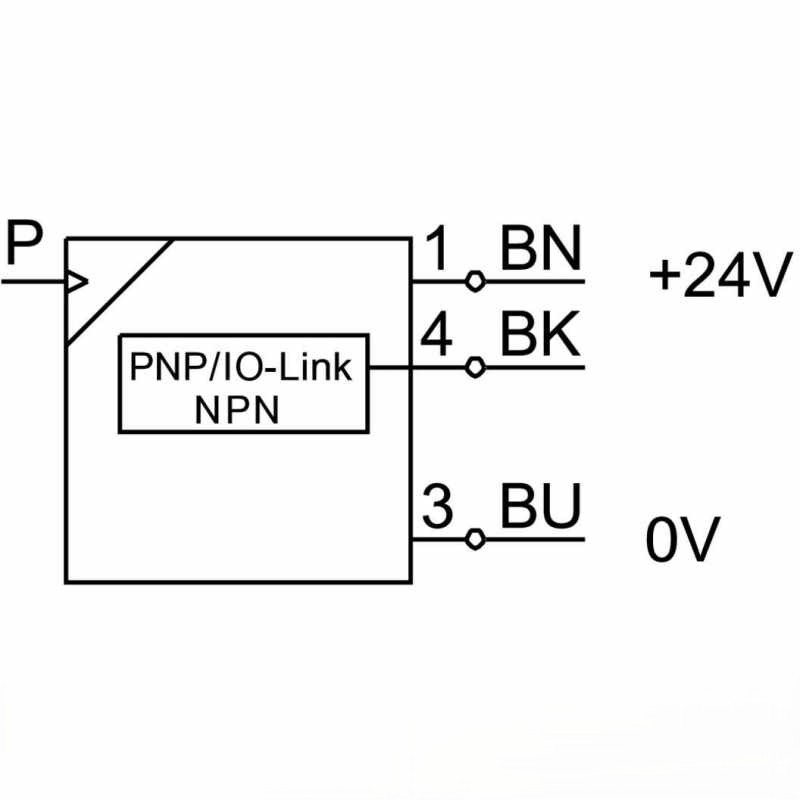
2. Wire the sensor into the pneumatic/electrical circuit
Connect the sensor’s signal wire to an analog input on your PLC or robot controller. This lets the analog vacuum value be read by the robot’s I/O.
3. Read the value in code
To read the analog value from Python using the ur_rtde library:
from rtde_receive import RTDEReceiveInterface

rtde_r = RTDEReceiveInterface("<robot IP>")
value = rtde_r.getActualAnalogInput0()  # replace 0 with the AI number the sensor is connected to
Check: the original source used a placeholder call (
robot.getAnalogInput0()) without specifying the library. The code above assumes you’re usingur_rtde’sRTDEReceiveInterface, whose actual method isgetActualAnalogInput0()/getActualAnalogInput1(). If you’re reading the value from a PLC instead, use that PLC’s analog-input read function.
Reference
SPAE operating instructions (PDF)
Related
- How to choose and use suction cups for picking up objects — building the rest of the suction cup / vacuum circuit
- How to control a Festo solenoid valve (VUVG-LK10-M52) from a UR robot — controlling the Festo solenoid valve that switches the vacuum generator
Rewritten and consolidated (Sept 2026) from the original student how-to’s: How to set up a vacuum sensor (festo spea 8001443).