Based on contributions by elenavoicila, aashish.
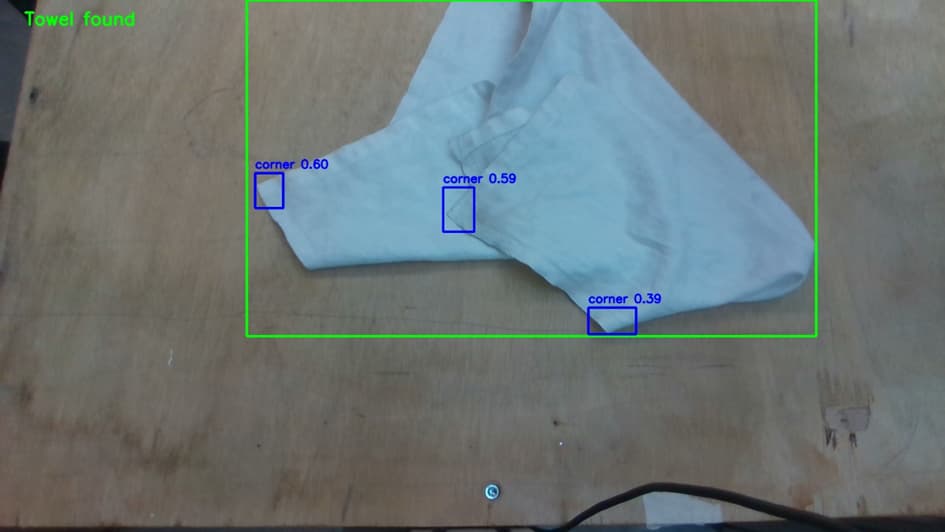
Once you’ve trained a YOLO model (see How to train a YOLO object detection model with Roboflow and Ultralytics), use this to run it live on a webcam feed, draw the detected boxes and labels with OpenCV, find the centre point of the best detection (useful as a robot pickup point), and save annotated frames to disk.
This code is for a regular (axis-aligned box) YOLO model. It will not work as-is with an OBB model — see How to train a YOLO OBB model and get the center and angle of detections for oriented bounding boxes.
What you need
- A trained model file (
best.pt) — see How to train a YOLO object detection model with Roboflow and Ultralytics pip install ultralytics opencv-python- A working camera connected to your PC
Steps
1. Import the required libraries
import cv2
from ultralytics import YOLO
2. Load your trained model
MODEL_PATH = r"path/to/best.pt"  # e.g. runs/detect/train/weights/best.pt
model = YOLO(MODEL_PATH)
3. Set up the camera
cap = cv2.VideoCapture(0)  # 0 for the default camera
if not cap.isOpened():
    print("Error: cannot access the camera.")
    exit()
4. Run detection on each frame
Read a frame, resize it to your training image size, and run the model on it:
ret, frame = cap.read()
if not ret:
    print("Error: cannot read frame.")
    break

frame_resized = cv2.resize(frame, (640, 640))
results = model.predict(frame_resized, verbose=False)
5. Draw the boxes and labels
for box in results[0].boxes:
    x1, y1, x2, y2 = map(int, box.xyxy[0])
    conf = box.conf[0].item()
    cls = int(box.cls[0].item())
    label = f"{model.names[cls]} {conf:.2f}"
    cv2.rectangle(frame_resized, (x1, y1), (x2, y2), (0, 255, 0), 2)
    cv2.putText(frame_resized, label, (x1, y1 - 10),
                cv2.FONT_HERSHEY_SIMPLEX, 0.5, (0, 255, 0), 2)
6. Find the centre of the most confident detection (optional)
If you need a single pickup point rather than every detection, take the box with the highest confidence and compute its centre:
boxes = results[0].boxes
if len(boxes) > 0:
    confs = boxes.conf.cpu().numpy()
    max_idx = confs.argmax()
    x1, y1, x2, y2 = boxes.xyxy[max_idx].cpu().numpy()
    cx, cy = (x1 + x2) / 2, (y1 + y2) / 2

    print(f"Most confident detection centre: ({cx:.2f}, {cy:.2f})")
    cv2.circle(frame_resized, (int(cx), int(cy)), 5, (0, 0, 255), -1)
If the bounding-box centre isn’t precise enough for your use case (e.g. an irregular object), you can refine it further with your own OpenCV logic on the pixels inside the box.
7. Save the annotated frame
output_path = "annotated_frame.jpg"
cv2.imwrite(output_path, frame_resized)
print(f"Saved annotated frame to {output_path}")
This overwrites
annotated_frame.jpgevery loop iteration. If you want to keep every frame, use a unique filename per save, e.g.f"annotated_{frame_count}.jpg".
8. Display the frame and exit on ‘q’
cv2.imshow("YOLO Detection", frame_resized)
if cv2.waitKey(1) & 0xFF == ord('q'):
    break
9. Release resources
cap.release()
cv2.destroyAllWindows()
Full code
import cv2
from ultralytics import YOLO

MODEL_PATH = r"path/to/best.pt"
model = YOLO(MODEL_PATH)

cap = cv2.VideoCapture(0)  # 0 for the default camera
if not cap.isOpened():
    print("Error: cannot access the camera.")
    exit()

frame_count = 0

while True:
    ret, frame = cap.read()
    if not ret:
        print("Error: cannot read frame.")
        break

    frame_resized = cv2.resize(frame, (640, 640))
    results = model.predict(frame_resized, verbose=False)
    boxes = results[0].boxes

    for box in boxes:
        x1, y1, x2, y2 = map(int, box.xyxy[0])
        conf = box.conf[0].item()
        cls = int(box.cls[0].item())
        label = f"{model.names[cls]} {conf:.2f}"
        cv2.rectangle(frame_resized, (x1, y1), (x2, y2), (0, 255, 0), 2)
        cv2.putText(frame_resized, label, (x1, y1 - 10),
                    cv2.FONT_HERSHEY_SIMPLEX, 0.5, (0, 255, 0), 2)

    if len(boxes) > 0:
        confs = boxes.conf.cpu().numpy()
        max_idx = confs.argmax()
        x1, y1, x2, y2 = boxes.xyxy[max_idx].cpu().numpy()
        cx, cy = (x1 + x2) / 2, (y1 + y2) / 2
        print(f"Most confident detection centre: ({cx:.2f}, {cy:.2f})")
        cv2.circle(frame_resized, (int(cx), int(cy)), 5, (0, 0, 255), -1)

    output_path = f"annotated_{frame_count}.jpg"
    cv2.imwrite(output_path, frame_resized)
    frame_count += 1

    cv2.imshow("YOLO Detection", frame_resized)
    if cv2.waitKey(1) & 0xFF == ord('q'):
        break

cap.release()
cv2.destroyAllWindows()
Common mistakes
- Loading the default pretrained weights (
yolo11n.pt) instead of your own trained model — always pointMODEL_PATHat yourbest.pt. - Saving every frame to the same filename, silently overwriting previous results — use a counter or timestamp if you want to keep them all.
- Forgetting
model.predict(..., verbose=False)— without it, Ultralytics prints a log line for every single frame.
Related
- How to train a YOLO object detection model with Roboflow and Ultralytics — train the model used here
- How to train a YOLO OBB model and get the center and angle of detections — detection and coordinates for oriented bounding box models
- How to run YOLOv8 or YOLOv8-OBB detection within a region of interest (ROI) — restrict detection to a region of interest (ROI)
Rewritten and consolidated (Sept 2026) from the original student how-to’s: How to Annotate and Save YOLO Detections with OpenCV, How to train and implement an AI optimally:.