Based on contributions by sarahstam, 20129556.
A regular YOLO bounding box is always axis-aligned, so it can’t tell you how an object is rotated. An oriented bounding box (OBB) model fits a rotated rectangle to each object instead, so you also get its angle — useful when a robot needs to pick up an object at the correct orientation.
What you need
- A Roboflow account (see How to annotate and label images in Roboflow for YOLO training for the general annotation workflow)
- Ultralytics (
pip install ultralytics) - Google Colab (free), or an Ultralytics HUB account as an alternative
- OpenCV (
pip install opencv-python) to run and visualise the trained model
Steps
1. Annotate with the polygon tool
Create a Roboflow project and, for each object, use the smart polygon tool (not the plain rectangle tool) to trace its actual outline. Roboflow uses the polygon shape to work out the object’s orientation later.
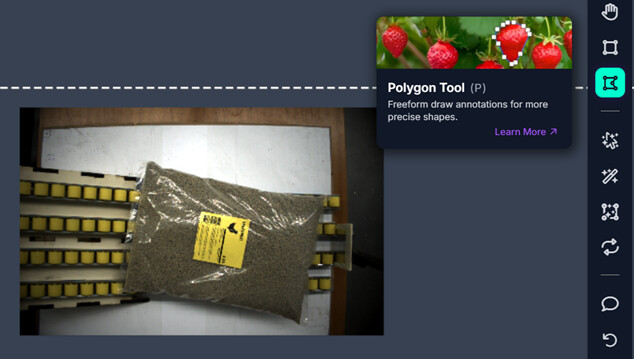
Use 70+ images if you can — more images generally give a more reliable model.
2. Export the dataset in OBB format
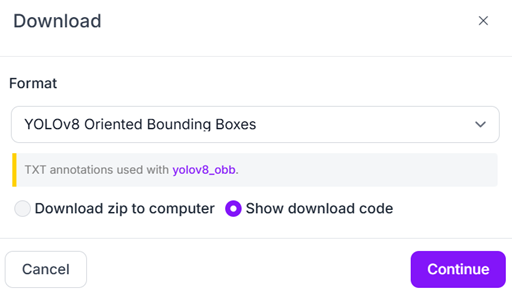
In the Generate tab, export your dataset with format “YOLOv8 Oriented Bounding Boxes” and copy the download link (or the Python download snippet).
3. Train the model
You can train an OBB model either directly in Colab with Ultralytics, or via Ultralytics HUB.
Option A: Google Colab with Ultralytics
%pip install ultralytics

!wget YOUR_ROBOFLOW_ZIP_LINK -O roboflow.zip   # paste your copied dataset link here

!mkdir -p /content/datasets
!unzip -o roboflow.zip -d /content/datasets

from ultralytics import YOLO
import os
os.environ['WANDB_MODE'] = 'disabled'

model = YOLO("yolo11n-obb.pt")
results = model.train(data="/content/datasets/data.yaml", epochs=200, imgsz=640)
Check: if your exported dataset doesn’t already contain a separate
valid/split, you may be tempted to copy thetrain/folder intovalid/just to satisfydata.yaml. Don’t do this for real evaluation — validating on the same images the model trained on gives misleadingly good metrics. Instead re-export from Roboflow with a proper train/valid split (step 8 of How to annotate and label images in Roboflow for YOLO training).
Once training finishes, find your model in the Colab file browser under runs/obb/train/weights/best.pt and download it.
Option B: Ultralytics HUB
- Go to hub.ultralytics.com and create a dataset, uploading your Roboflow OBB export.
- Set the dataset’s task to OBB.
- If HUB complains your dataset doesn’t match its expected sample layout, unzip your Roboflow export locally, rename files/folders to match exactly what HUB expects, and re-zip it before uploading.
- Open the dataset and click Train model. HUB generates a ready-to-run Google Colab notebook — follow it to train.
- If training fails because a folder can’t be found, your dataset layout is still wrong — go back to step 3.
- When training finishes, find your model under
runs/obb/train/weights/best.ptin the Colab files panel and downloadbest.pt.
4. Run the model and read center, size, and rotation
results[0].obb.xywhr gives, for every detection, the box centre (x, y), width, height, and rotation in radians:
import math
import cv2
from ultralytics import YOLO

MODEL_PATH = r"path/to/best.pt"
model = YOLO(MODEL_PATH)

def detect_obb(image, confidence_threshold=0.8):
    results = model(image, conf=confidence_threshold)
    return results

def get_obb_info(results, annotated_image):
    """Return a list of [x_center, y_center, rotation_degrees] for every detection,
    and draw a dot at the centre of each one."""
    detections = []
    for result in results:
        for x, y, w, h, r in result.obb.xywhr.cpu().numpy():
            x_center, y_center = int(x), int(y)
            rotation_deg = int(r * 180 / math.pi)
            cv2.circle(annotated_image, (x_center, y_center), radius=5, color=(0, 0, 255), thickness=-1)
            detections.append([x_center, y_center, rotation_deg])
    return detections

results = detect_obb(image)
annotated_image = results[0].plot()  # draws the rotated boxes
detections = get_obb_info(results, annotated_image)
print(detections)

cv2.imshow("OBB detections", annotated_image)
cv2.waitKey(0)
cv2.destroyAllWindows()
If your camera outputs raw Bayer-pattern data rather than a normal BGR/RGB image, convert it first with something like
cv2.cvtColor(image, cv2.COLOR_BAYER_RG2RGB)before passing it to the model. Most webcams already give you a regular BGR image and don’t need this step.
5. Using an Intel RealSense camera (optional)
If your setup uses a RealSense camera for combined colour and depth, you can feed its colour stream into the same model:
import math
import cv2
import numpy as np
import pyrealsense2 as rs
from ultralytics import YOLO

model = YOLO("path/to/best.pt", task="obb")

pipeline = rs.pipeline()
config = rs.config()
config.enable_stream(rs.stream.color, 640, 480, rs.format.bgr8, 30)
config.enable_stream(rs.stream.depth, 640, 480, rs.format.z16, 30)

align = rs.align(rs.stream.color)
pipeline.start(config)

PERSIST = True
CONFIDENCE_THRESHOLD = 0.5
IMAGE_SIZE = 640

try:
    while True:
        frames = pipeline.wait_for_frames()
        aligned_frames = align.process(frames)

        depth_frame = aligned_frames.get_depth_frame()
        color_frame = aligned_frames.get_color_frame()
        if not depth_frame or not color_frame:
            continue

        depth_image = np.asanyarray(depth_frame.get_data())
        color_image = np.asanyarray(color_frame.get_data())
        depth_colormap = cv2.applyColorMap(cv2.convertScaleAbs(depth_image, alpha=0.5), cv2.COLORMAP_JET)

        results = model.track(color_image, persist=PERSIST, conf=CONFIDENCE_THRESHOLD, imgsz=IMAGE_SIZE)
        yolo_image = results[0].plot()

        for result in results:
            for x, y, w, h, r in result.obb.xywhr.cpu().numpy():
                x_center, y_center = int(x), int(y)
                rotation_deg = int(r * 180 / math.pi)
                cv2.circle(yolo_image, (x_center, y_center), 5, (0, 0, 255), -1)
                print(f"centre=({x_center},{y_center}) rotation={rotation_deg} deg")

        cv2.imshow("frame", yolo_image)
        cv2.imshow("depth", depth_colormap)

        if cv2.waitKey(1) == 27:  # Esc
            break
finally:
    pipeline.stop()
    cv2.destroyAllWindows()
Troubleshooting
- Ultralytics HUB rejects your dataset: your unzipped Roboflow export’s folder/file names must match HUB’s expected sample layout exactly — check spelling and casing.
- Rotation values look wrong:
xywhrreturns rotation in radians, not degrees. Convert withrotation * 180 / math.pi(and make sureimport mathis present). - Validation accuracy looks suspiciously perfect: check you’re not validating on the same images used for training (see the Check note above).
Related
- How to annotate and label images in Roboflow for YOLO training — annotate images in Roboflow
- How to augment images and OBB labels to expand a YOLO training set — augment images and OBB labels to grow your dataset
- How to run YOLOv8 or YOLOv8-OBB detection within a region of interest (ROI) — run OBB (or regular) detection within a region of interest
Rewritten and consolidated (Sept 2026) from the original student how-to’s: How to make a YOLO model with orientated bounding boxes to find the center and angle of the bounding box, How to use orientated Bounding Boxes (obb) using Yolo.